



Your podcast episodes contain valuable content, but without text versions, you’re limiting their reach significantly. Search engines can’t index audio. Hearing-impaired audiences can’t access your show. And busy listeners who prefer reading miss out entirely. A reliable podcast transcription service solves all these problems, turning your spoken words into searchable, shareable, accessible text.
But which service should you choose? The options range from free AI tools that work in seconds to professional human transcribers who catch every nuance. Some prioritize speed, others accuracy. Some handle multiple speakers flawlessly, while others struggle with crosstalk and accents.
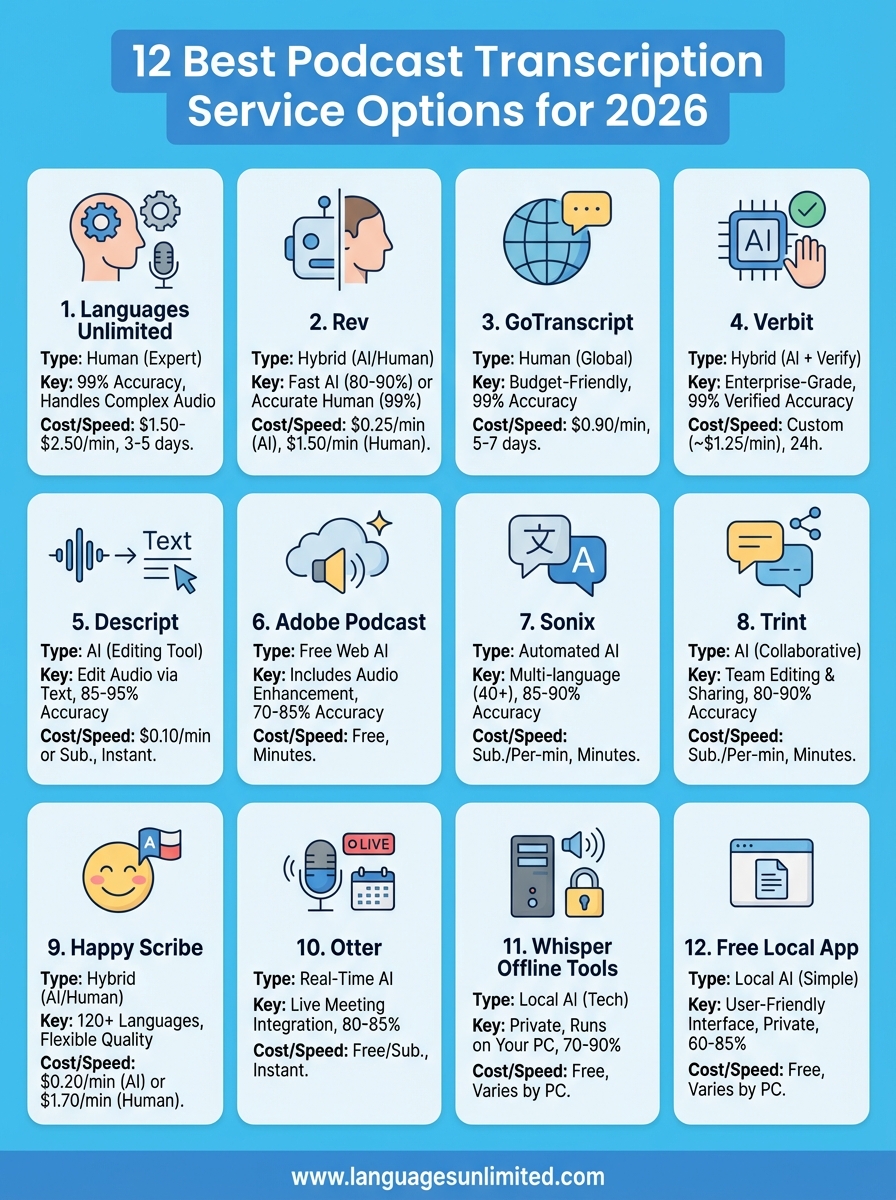
At Languages Unlimited, we’ve provided transcription services since 1994, working with everything from legal depositions to medical recordings. That experience gives us perspective on what separates mediocre transcription from excellent results. In this guide, we’ve evaluated 12 podcast transcription services for 2026, comparing accuracy, pricing, turnaround times, and best use cases to help you find the right fit for your show.
1. Languages Unlimited
Languages Unlimited brings over 30 years of professional transcription experience to podcast creators who need precision over speed. Their human transcribers handle complex audio with multiple speakers, heavy accents, and technical terminology that often trips up automated systems. You submit your audio files through their secure portal, and their team delivers polished transcripts that capture every word accurately. This podcast transcription service works particularly well for interview shows, roundtable discussions, and episodes where accuracy matters more than instant turnaround.

Transcription type and workflow
You work with human transcribers exclusively at Languages Unlimited, which means no AI shortcuts or automated processing. Their workflow starts when you upload your podcast file through a secure client portal. The team assigns your project to a transcriber with relevant subject matter expertise, whether your show covers legal topics, medical discussions, or general interest content. You can request specific formatting preferences, timestamps at custom intervals, and verbatim versus clean read transcripts depending on your needs.
Accuracy and speaker labels
Their transcribers achieve 99% accuracy rates because real humans catch context clues that software misses. Speaker identification comes standard, with each person clearly labeled throughout your transcript. The team handles overlapping dialogue and crosstalk effectively, noting when multiple people speak simultaneously. If your podcast features guests with strong accents or uses industry-specific terminology, their transcribers research unfamiliar terms to ensure proper spelling and context.
Professional human transcription catches the nuances, corrections, and context that even the best AI systems still miss in conversational podcast audio.
Exports and deliverables
You receive your finished transcript in Microsoft Word, plain text, or PDF format based on your preference. The team can add timestamps at intervals you specify, from every 30 seconds to marking only major topic shifts. They format transcripts with clear speaker labels, paragraph breaks, and proper punctuation that make the text readable and professional. If you need specific styling for publication or additional formatting, they accommodate custom requests as part of the service.
Privacy, security, and compliance
Languages Unlimited maintains secure file transfer protocols and confidential handling procedures for all audio files. Their transcribers sign non-disclosure agreements, which matters if your podcast discusses sensitive business information or unreleased content. The company holds GSA contract status, meaning they meet federal security standards for handling government-related content. Files stay encrypted during transfer and storage, then get deleted after project completion per your retention preferences.
Pricing and turnaround
Expect to pay $1.50 to $2.50 per audio minute depending on audio quality, number of speakers, and turnaround speed. Standard delivery takes three to five business days for most podcast episodes. Rush services cost more but deliver transcripts within 24 to 48 hours when you face tight deadlines. You get volume discounts for regular podcast transcription if you commit to monthly minimums, making the per-minute rate more competitive for established shows with consistent episode schedules.
2. Rev
Rev operates as a hybrid podcast transcription service that lets you choose between automated AI transcripts or human transcribers. Their platform serves over 100,000 customers, from individual podcasters to major media companies, offering quick turnaround times and competitive pricing. You upload audio files directly through their web interface or mobile app, selecting whether you want machine-generated results in minutes or human accuracy within hours.
Transcription type and workflow
You pick between AI-generated transcripts delivered in five minutes or human transcription completed within 12 hours. The upload process works through Rev’s website or mobile apps for iOS and Android. Their system accepts common audio formats including MP3, WAV, and M4A files up to 7GB in size. After uploading, you receive email notifications when your transcript finishes processing.
Accuracy and speaker labels
Rev’s AI transcription claims 80% to 90% accuracy on clear audio, while their human service guarantees 99% accuracy. The automated system attempts speaker identification but struggles with overlapping dialogue and similar-sounding voices. Human transcribers tag each speaker consistently and note when audio quality prevents clear identification.
AI transcription works well for single-speaker podcasts with clean audio, but human transcribers handle complex conversations with multiple guests more reliably.
Exports and deliverables
Your finished transcript downloads as plain text, Microsoft Word, PDF, or SRT caption files. Rev includes timestamps with each speaker change in their standard format. You can access and edit transcripts through their online editor before downloading, fixing any errors the AI system made or adjusting speaker labels.
Privacy, security, and compliance
Rev maintains SOC 2 Type II certification for data security and offers HIPAA-compliant transcription for healthcare-related content. Their human transcribers sign confidentiality agreements. Files get encrypted during transfer and storage, with automatic deletion available after 30 days.
Pricing and turnaround
AI transcription costs $0.25 per minute with five-minute delivery. Human transcription runs $1.50 per minute with 12-hour standard turnaround. You pay extra for rush delivery within one to three hours. Rev charges per minute of audio, rounding up to the nearest minute for billing.
3. GoTranscript
GoTranscript relies on human transcribers distributed globally to deliver accurate podcast transcripts at budget-friendly rates. Their platform has processed millions of minutes of audio since 2005, building a reputation for consistent quality at lower price points than many competitors. You submit your podcast episodes through their straightforward web interface, and their team of vetted transcribers handles the rest. This podcast transcription service appeals to podcasters who want human accuracy without premium pricing, though you trade speed for savings.
Transcription type and workflow
You upload audio files through GoTranscript’s web portal, supporting formats like MP3, WAV, and M4A up to 5GB per file. Their system routes your podcast to available human transcribers based on workload and expertise. You specify transcription style preferences during upload, choosing between verbatim transcripts that capture every utterance or clean versions that remove filler words and false starts. The platform sends email updates when transcribers claim your job and again when they complete the work.
Accuracy and speaker labels
Their transcribers deliver 99% accuracy rates verified through internal quality checks. Speaker identification comes standard, with each person tagged consistently throughout your transcript. You receive clear notation when speakers overlap or when audio quality prevents definite identification. The system allows you to review and request revisions if you spot errors or mislabeled speakers.
Human transcription consistently outperforms AI for podcasts with technical vocabulary, accents, or poor audio quality where context matters.
Exports and deliverables
Your completed transcript downloads in Microsoft Word, plain text, PDF, or SRT subtitle formats. GoTranscript includes timestamps at speaker changes by default. You can request custom timestamp intervals or specific formatting through their notes field during upload. The online editor lets you make adjustments before downloading final files.
Privacy, security, and compliance
GoTranscript uses encrypted file transfers and secure storage for all audio uploads. Their transcribers sign confidentiality agreements covering your content. The company offers HIPAA-compliant transcription for healthcare-related podcasts. Files remain in their system for 30 days unless you request earlier deletion.
Pricing and turnaround
Standard transcription costs $0.90 per audio minute with five to seven day turnaround. Express service delivers within 24 hours at $1.35 per minute. You pay only for actual audio duration, not file size. Monthly subscription plans reduce per-minute rates if you transcribe multiple episodes regularly.
4. Verbit
Verbit combines AI transcription with human verification to deliver enterprise-grade accuracy for podcasters who need reliable results quickly. Their platform serves major media companies, educational institutions, and content creators who handle high-volume transcription projects requiring consistent quality. You upload your podcast episodes through their web interface, and their system processes audio through AI models before human editors review and correct the output. This hybrid approach delivers accuracy comparable to pure human transcription at speeds closer to automated services.
Transcription type and workflow
Your podcast goes through two-stage processing at Verbit. Their AI engine transcribes your audio first, then human editors review and correct the machine-generated text. You upload files through their web platform or integrate directly with popular podcast hosting services through API connections. The system supports batch uploads if you need to process multiple episodes simultaneously. You can specify turnaround requirements and transcription style preferences during submission.
Accuracy and speaker labels
Verbit guarantees 99% accuracy on their human-reviewed transcripts. Their AI identifies speakers automatically, and human editors verify these labels during quality checks. The system handles complex audio with multiple participants effectively, marking speaker changes and overlapping dialogue. You receive notation when audio quality prevents definite speaker identification.
AI-assisted transcription with human review gives you near-perfect accuracy without the extended wait times of pure human transcription.
Exports and deliverables
You download completed transcripts in formats including Word, plain text, PDF, SRT, and VTT. Verbit includes timestamps at regular intervals or speaker changes based on your preferences. Their platform offers an online editor where you can review and adjust transcripts before downloading final versions.
Privacy, security, and compliance
Verbit maintains SOC 2 Type II certification and GDPR compliance for international data protection standards. They offer HIPAA-compliant transcription for healthcare-related content. All files transfer through encrypted connections and remain protected in secure cloud storage. Their human editors sign confidentiality agreements covering your audio content.
Pricing and turnaround
Custom pricing starts around $1.25 per audio minute for standard delivery within 24 hours. Rush turnaround delivers transcripts in as little as four hours at premium rates. Enterprise contracts with volume commitments reduce per-minute costs for regular podcast transcription needs.
5. Descript
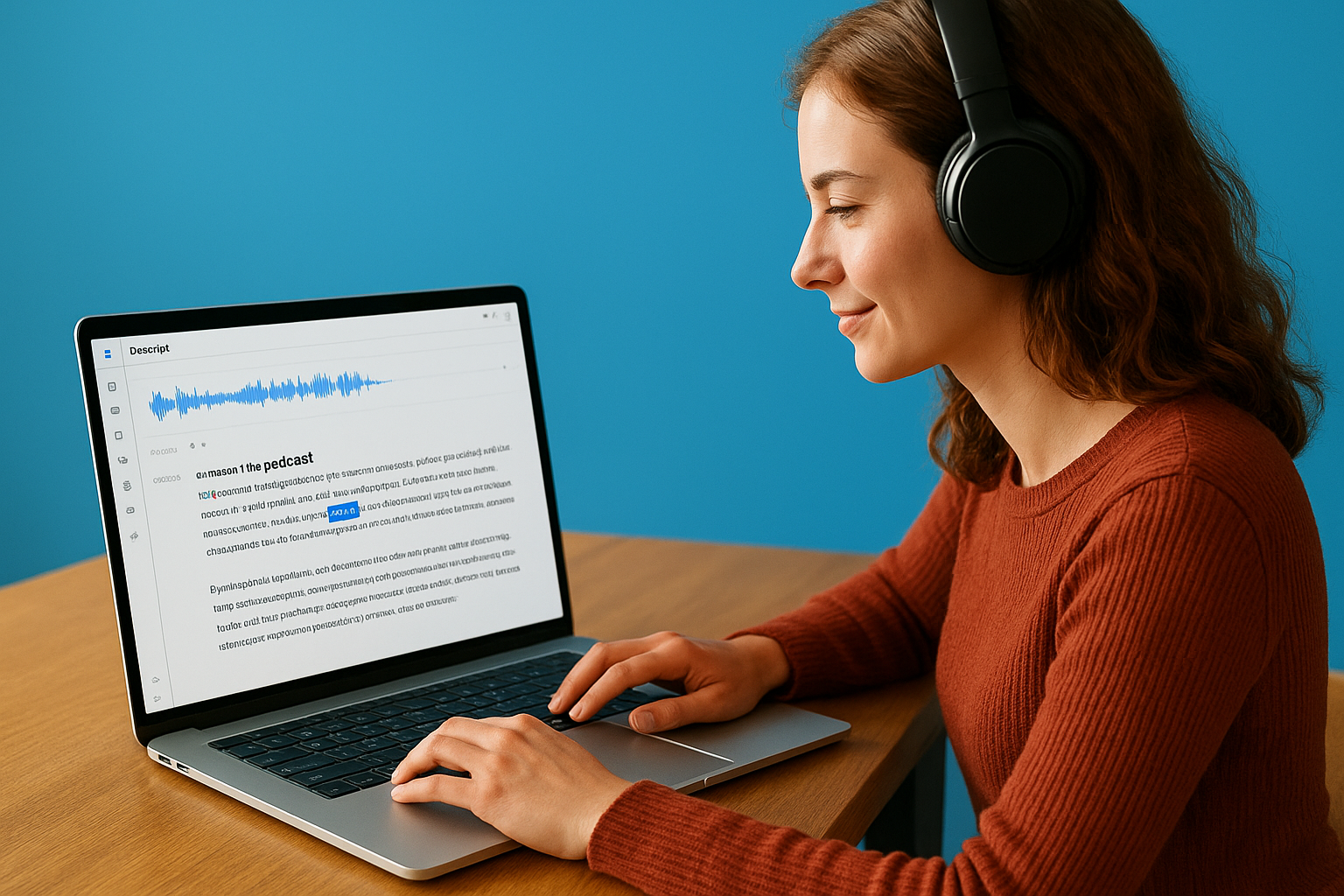
Descript started as a podcast editing platform and built transcription directly into its workflow, making it popular among podcasters who want editing and text generation in one tool. You upload your audio, and Descript transcribes it automatically while giving you the ability to edit your podcast by editing the transcript text. This podcast transcription service functions differently from standalone transcription tools because it treats your transcript as the primary editing interface. Changes you make to the text automatically adjust the underlying audio, creating a workflow that appeals to podcasters who prefer working with words over waveforms.
Transcription type and workflow
You work with AI-generated transcripts that process automatically when you upload audio files to Descript. The system transcribes as you record if you capture audio directly in their app. Your transcript appears in an editable document format where you can cut, copy, paste, and rearrange text to restructure your podcast. The workflow integrates transcription tightly with editing, letting you remove filler words, delete mistakes, and reorganize segments by manipulating the transcript text.
Accuracy and speaker labels
Descript’s AI achieves 85% to 95% accuracy depending on audio quality and speaker clarity. The system automatically detects and labels different speakers in multi-person recordings. You can train Descript to recognize specific voices by providing sample audio for frequent guests or co-hosts, improving speaker identification accuracy over time. The platform highlights low-confidence words so you can quickly spot and correct transcription errors.
Exports and deliverables
Your transcript exports as plain text, Word documents, PDF files, or SRT caption formats. Descript includes timestamps automatically. The platform generates audiograms and video clips with burned-in captions directly from your transcript, saving steps if you create social media content from your episodes.
Integrated transcription and editing tools let you fix both your audio and text simultaneously, reducing the time you spend on podcast production.
Privacy, security, and compliance
Descript encrypts files during transfer and storage. Their privacy policy covers how they handle your audio data, though they don’t currently offer HIPAA-compliant transcription for healthcare content. Files remain in your workspace until you delete them manually.
Pricing and turnaround
Transcription costs $0.10 per minute for paid subscribers or comes included with Creator and Pro plans at $12 to $24 monthly. You get AI transcription instantly upon upload. Free accounts include limited transcription hours monthly.
6. Adobe Podcast
Adobe Podcast operates as a free web-based platform that combines AI transcription with audio enhancement tools specifically designed for podcast creators. You upload your audio files through their browser interface, and the system transcribes your content while offering background noise removal and voice enhancement features. This podcast transcription service attracts creators who want basic transcription bundled with audio cleanup capabilities, though it lacks the advanced features and accuracy guarantees found in professional services. The platform requires an Adobe account but doesn’t charge for core transcription and enhancement features.
Transcription type and workflow
You work with AI-powered automatic transcription that processes your audio files immediately after upload. The web interface accepts MP3 and WAV files up to one hour in length per upload. Adobe’s system transcribes as it enhances your audio, applying noise reduction and voice clarity improvements simultaneously. You access both your cleaned audio and transcript through the same project workspace.
Accuracy and speaker labels
Adobe Podcast’s AI transcription delivers 70% to 85% accuracy on typical podcast audio. The system struggles with speaker identification in multi-person recordings, often requiring manual corrections. You need to review and edit transcripts carefully since the platform doesn’t offer human verification options or quality guarantees.
Free AI transcription saves money but demands your time for manual corrections, especially on interviews and roundtable discussions with multiple participants.
Exports and deliverables
Your transcript downloads as plain text or SRT caption files. Adobe includes basic timestamps but offers limited formatting options compared to professional services. The platform lets you export enhanced audio separately from transcription files.
Privacy, security, and compliance
Adobe encrypts uploads through standard HTTPS connections. Their privacy policy covers data handling, though the platform doesn’t provide HIPAA compliance or specialized security certifications for sensitive content. Files remain in your Adobe account storage indefinitely unless you delete them manually.
Pricing and turnaround
Adobe Podcast provides free transcription and audio enhancement with no usage limits currently imposed. Processing completes within minutes for typical podcast episodes. The company may introduce paid tiers or usage restrictions as the service develops.
7. Sonix
Sonix delivers automated AI transcription with built-in editing tools that let you search, organize, and repurpose your podcast content efficiently. Their platform serves media companies, content creators, and marketing teams who need quick transcription combined with collaborative editing features. You upload your audio files through their web interface, and the AI processes your episodes within minutes. This podcast transcription service stands out for its multi-language support and integrated tools for creating clips, captions, and social media content directly from your transcripts.
Transcription type and workflow
You work with AI-generated transcripts that process automatically when you upload audio files to Sonix. Their system accepts common podcast formats including MP3, WAV, M4A, and video files if you create video podcasts. The platform supports drag-and-drop uploads or direct imports from cloud storage services like Dropbox and Google Drive. You can transcribe in over 40 languages, making Sonix useful for multilingual podcast creators.
Accuracy and speaker labels
Sonix’s AI achieves 85% to 90% accuracy on clear podcast audio with native English speakers. The system automatically detects and labels different speakers, though you often need to rename the generic speaker tags it assigns. Their AI-powered editor highlights low-confidence words in different colors, letting you quickly locate sections that need manual review and correction.
AI transcription accuracy drops significantly with background noise, technical terminology, or speakers with heavy accents, requiring more manual editing time.
Exports and deliverables
Your finished transcript downloads in Word, PDF, plain text, SRT, VTT, and other caption formats. Sonix includes timestamps throughout your transcript. The platform offers direct export to video editing software and social media platforms, streamlining your content repurposing workflow.
Privacy, security, and compliance
Sonix maintains SOC 2 Type II certification for data security standards. They encrypt files during transfer and storage. The platform doesn’t currently offer HIPAA-compliant transcription. Files remain in your account workspace until you manually delete them.
Pricing and turnaround
Standard plans start at $10 monthly for 5 hours of transcription, with per-minute rates around $0.17 for additional usage. Enterprise plans offer volume discounts. Transcription completes within 3 to 5 minutes per hour of audio, delivering results quickly for most podcast episodes.
8. Trint
Trint offers AI-powered transcription with collaborative editing features designed for journalists, content creators, and podcast teams who need to search and share transcripts efficiently. Their platform transcribes your audio automatically and provides tools for highlighting, commenting, and extracting clips directly within the transcript interface. You upload your podcast files through their web application, and the system processes episodes quickly while maintaining searchable archives of all your transcribed content. This podcast transcription service works well for podcasters who collaborate with editors, producers, or guests who need access to episode transcripts.
Transcription type and workflow
You work with automated AI transcription that processes your audio files within minutes of upload. Trint’s web interface accepts MP3, WAV, M4A, and video formats up to 10GB per file. The platform supports direct integration with cloud storage services and offers a mobile app for recording and transcribing on the go. You can organize transcripts into folders and invite team members to collaborate on editing specific episodes.
Accuracy and speaker labels
Trint’s AI delivers 80% to 90% accuracy on standard podcast audio with clear speakers. The system attempts automatic speaker detection but requires manual verification and labeling for best results. Their editor displays confidence scores next to transcribed words, helping you identify sections that need review. You can train the platform to recognize recurring names, brands, and technical terms specific to your podcast.
Exports and deliverables
Your transcripts download in Word, plain text, PDF, SRT, and VTT formats with timestamps included throughout. Trint lets you export highlighted sections as separate files, useful for creating show notes or social media snippets. The platform generates shareable links for web-based transcript viewing without requiring downloads.
Collaborative editing features save time when multiple team members need to review, correct, or extract content from your podcast transcripts.
Privacy, security, and compliance
Trint maintains SOC 2 Type II certification and GDPR compliance for international privacy standards. Files transfer through encrypted connections. The platform offers options to restrict transcript access to specific team members and automatic deletion after set retention periods.
Pricing and turnaround
Plans start at $48 monthly for 7 hours of transcription, with additional minutes costing around $0.32 each. Enterprise plans provide volume pricing for regular transcription needs. Processing completes within 5 to 10 minutes per hour of audio uploaded.
9. Happy Scribe
Happy Scribe provides AI and human transcription options through a straightforward web platform that serves podcasters, content creators, and businesses across 120 languages. Their service lets you choose between fast automated transcripts or professional human accuracy depending on your budget and quality requirements. You upload your audio files through their browser interface, select your preferred transcription method, and receive formatted transcripts ready for editing. This podcast transcription service appeals to creators who want flexibility in balancing cost, speed, and accuracy for different episodes.
Transcription type and workflow
You select between AI transcription that completes in minutes or human transcription delivered within 24 to 48 hours during upload. Their web platform accepts common audio formats including MP3, WAV, and M4A files without size restrictions for paid accounts. The system supports direct uploads or imports from cloud storage services. You can request verbatim or clean read transcription styles and specify language preferences for multilingual content.
Accuracy and speaker labels
Happy Scribe’s AI achieves 85% accuracy on clear audio, while their human service guarantees 99% accuracy with professional review. The automated system identifies speakers but often requires manual correction for multiple participants. Human transcribers label each speaker consistently and note when overlapping dialogue or poor audio quality prevents definite identification.
Exports and deliverables
Your completed transcript downloads in Word, PDF, plain text, SRT, and VTT formats with timestamps included. Happy Scribe’s online editor lets you review and adjust transcripts before downloading. The platform generates subtitles and captions directly from transcripts for video podcast distribution.
Choosing between AI and human transcription for different episodes lets you optimize your budget while maintaining quality where it matters most.
Privacy, security, and compliance
Happy Scribe encrypts file transfers and maintains GDPR compliance for European privacy standards. Their human transcribers sign confidentiality agreements. The platform doesn’t currently offer HIPAA-compliant transcription for healthcare content. Files remain in your account until manual deletion.
Pricing and turnaround
AI transcription costs $0.20 per minute with completion in 5 to 10 minutes. Human transcription runs $1.70 per minute with 24-hour standard delivery. Monthly subscriptions reduce per-minute rates for regular podcast transcription needs.
10. Otter
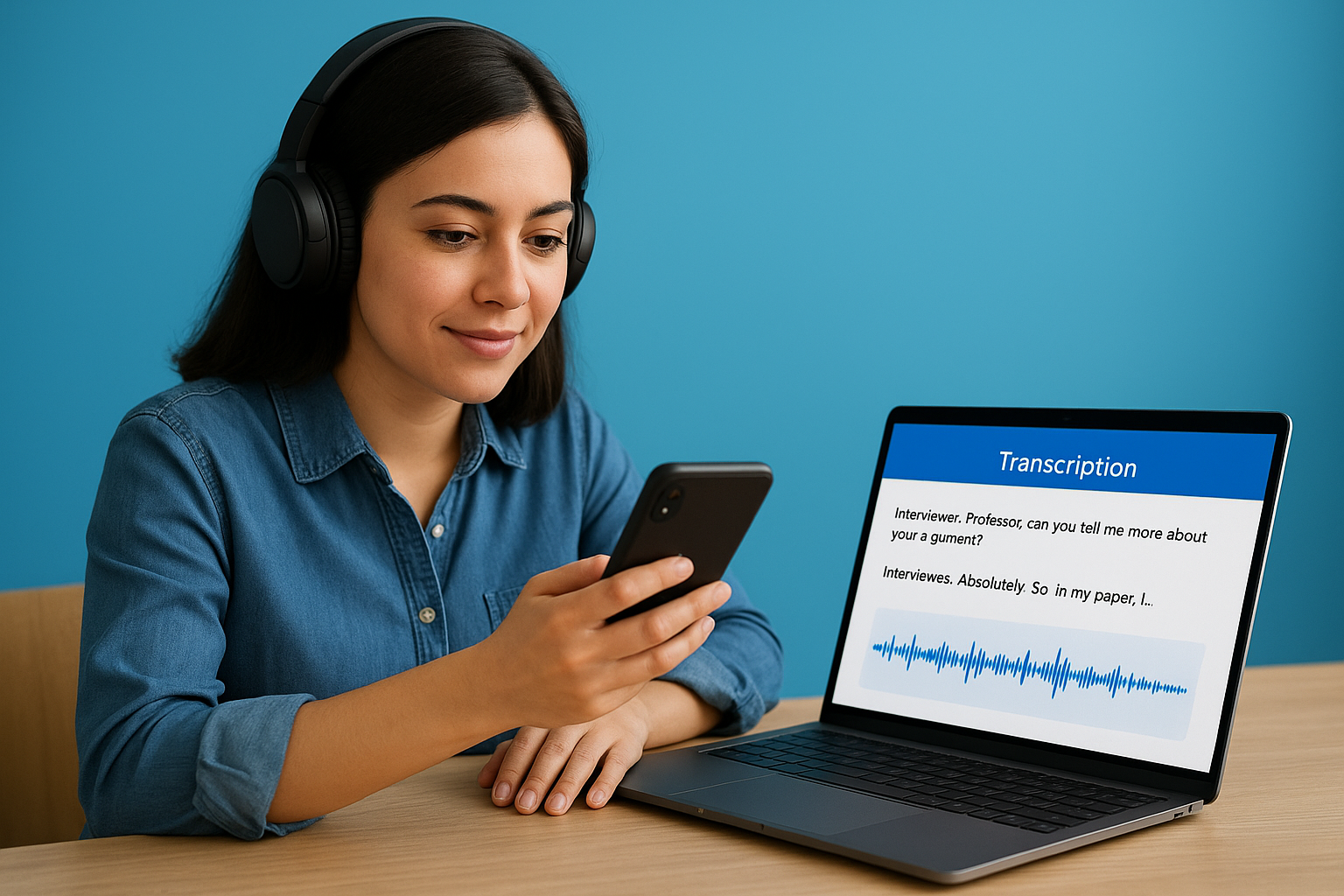
Otter specializes in real-time AI transcription designed for meetings and conversations, making it a popular choice among podcasters who record remote interviews. Their platform transcribes live as you record through their mobile app or web interface, letting you capture and review content immediately during or after recording sessions. You can also upload pre-recorded audio files for transcription. This podcast transcription service attracts creators who conduct interviews via Zoom or other video conferencing platforms since Otter integrates directly with these tools to capture and transcribe conversations automatically.
Transcription type and workflow
You work with AI-powered automatic transcription that processes in real time during recording or within minutes for uploaded files. Otter’s mobile apps for iOS and Android let you record and transcribe simultaneously, useful for in-person interviews or field recordings. The platform connects directly to Zoom, Google Meet, and Microsoft Teams, automatically joining scheduled meetings to record and transcribe your podcast interviews. You can also upload existing audio files in MP3, WAV, and M4A formats through their web interface.
Accuracy and speaker labels
Otter’s AI achieves 80% to 85% accuracy on clear conversational audio with native English speakers. The system identifies different voices automatically but often mislabels speakers in multi-person conversations, requiring manual corrections. You can train Otter to recognize specific voices by providing sample recordings of regular hosts or frequent guests, improving speaker identification over time. The platform displays confidence scores for transcribed words, helping you spot sections needing review.
Real-time transcription lets you catch missing information during interviews, but expect to spend time correcting AI errors before publishing your transcripts.
Exports and deliverables
Your transcripts download as plain text, SRT caption files, or PDF documents with timestamps included. Otter generates shareable links for web-based viewing without requiring downloads. The platform creates audio snippets and clips directly from highlighted transcript sections, streamlining your content repurposing workflow.
Privacy, security, and compliance
Otter encrypts files during transfer and storage through standard security protocols. Their privacy policy covers data handling practices. The platform doesn’t currently offer HIPAA compliance for healthcare-related content. Files remain in your account workspace until you delete them manually.
Pricing and turnaround
Free accounts include 600 minutes monthly with 30-minute maximum file length. Pro plans cost $16.99 monthly for 6,000 minutes with longer file support. Business plans at $30 per user monthly add team collaboration features. Real-time transcription completes instantly during recording, while uploaded files process within 3 to 5 minutes.
11. Podcast transcription with Whisper offline tools
OpenAI’s Whisper model runs on your own computer, giving you free AI transcription without sending audio files to external servers. You download the open-source software, install it locally, and process your podcast episodes entirely offline. This podcast transcription service approach appeals to creators who prioritize privacy or want to avoid recurring subscription costs, though it requires technical comfort with command-line tools or third-party applications that implement Whisper. Your transcription quality depends heavily on your computer’s processing power, with newer graphics cards delivering faster and more accurate results.
Transcription type and workflow
You work with AI transcription that processes entirely on your local hardware after downloading the Whisper model files. Various implementations exist, from command-line interfaces requiring terminal commands to desktop applications like Whisper Desktop or MacWhisper that provide graphical interfaces. The workflow involves dragging audio files into the application or specifying file paths through commands. Processing speed varies dramatically based on your computer’s specifications, with GPU acceleration cutting transcription time significantly compared to CPU-only processing.
Accuracy and speaker labels
Whisper achieves 70% to 90% accuracy depending on audio quality and which model size you download. Larger models deliver better accuracy but require more powerful hardware and longer processing times. The system struggles with speaker identification in multi-person recordings, often producing continuous text without distinguishing between different voices. You need to add speaker labels manually or use additional tools that attempt diarization alongside Whisper’s transcription.
Local transcription with Whisper gives you complete privacy control since your audio files never leave your computer during processing.
Exports and deliverables
Your transcripts save as plain text, SRT, VTT, or JSON files depending on the implementation you choose. Most Whisper tools include timestamps automatically. You receive raw transcription output without formatting or editing capabilities, requiring separate text editors for cleanup and refinement.
Privacy, security, and compliance
Everything processes offline on your local machine, eliminating cloud storage and third-party access concerns. No files transfer over networks during transcription. You maintain complete control over audio file retention and deletion.
Pricing and turnaround
Whisper costs nothing except electricity and hardware investment. Processing takes 5 to 30 minutes per hour of audio depending on your computer’s capabilities and selected model size. No usage limits or subscription fees apply.
12. Free Podcast Transcription local app
Free desktop applications like Subtitle Edit, Transcribe!, and other local tools provide user-friendly interfaces for podcast transcription without recurring subscription fees. These programs run entirely on your computer, processing audio files locally rather than uploading them to cloud services. You install the software once, and it remains available for unlimited transcription projects without usage caps or monthly charges. This podcast transcription service approach suits podcasters who want cost-free transcription with privacy benefits, though you sacrifice the accuracy and polish that professional services deliver.
Transcription type and workflow
You install desktop software that uses AI transcription engines like Whisper or similar open-source models built into the application. The workflow involves dragging your podcast files into the program’s window or selecting them through file browsers. Most free apps provide graphical interfaces that eliminate command-line complexity, making them accessible even if you lack technical expertise. Processing happens entirely on your local machine, with transcription speed depending on your computer’s processor and available memory.
Accuracy and speaker labels
Free local apps deliver 60% to 85% accuracy on typical podcast audio, varying significantly based on which transcription engine the software uses. Speaker identification remains limited or absent in most free applications. You manually add speaker labels after transcription completes, reviewing the text to identify where different people speak.
Exports and deliverables
Your transcripts save as plain text, SRT subtitle files, or basic document formats depending on the specific application. Most free tools include timestamps automatically. You receive unformatted transcription output requiring manual editing for punctuation, capitalization, and paragraph breaks.
Free local transcription eliminates ongoing costs but demands significant editing time to produce polished, publication-ready transcripts.
Privacy, security, and compliance
All processing occurs offline on your computer, keeping your podcast files completely private. No cloud uploads or third-party access occurs during transcription. You control file retention and deletion according to your own preferences.
Pricing and turnaround
These applications cost nothing beyond the initial download, with no subscription fees or usage limits. Processing takes 10 to 40 minutes per hour of audio depending on your hardware capabilities. Free versions sometimes include watermarks or feature restrictions that paid upgrades remove.
Picking the right service
Your choice of podcast transcription service depends on your accuracy requirements, budget constraints, and turnaround expectations. Free AI tools work adequately for solo shows with clean audio where you don’t mind spending time on corrections. Automated services like Rev or Sonix deliver quick results at moderate costs when you need transcripts fast but can tolerate occasional errors. Professional human transcription becomes necessary when you discuss technical subjects, interview multiple guests simultaneously, or publish transcripts where accuracy builds your credibility.
Consider your workflow needs too. Some platforms integrate with editing software while others focus purely on delivering polished text. Your privacy requirements matter if you discuss unreleased products, proprietary business information, or sensitive topics that shouldn’t pass through automated systems.
Languages Unlimited specializes in human transcription for podcasters who need precision over speed. Our transcribers handle complex audio with multiple speakers, technical terminology, and challenging accents that trip up automated systems. Contact our team to discuss your podcast transcription needs and receive a custom quote.