



If you’ve been researching transcription tools, there’s a good chance Happy Scribe transcription has come up in your search. The platform has gained traction among content creators, researchers, journalists, and businesses looking for a straightforward way to convert audio and video into text. But before you commit your time or budget, it helps to understand exactly what you’re getting, and where the limits are.
Happy Scribe offers both automated and human-made transcription, each with different price points and accuracy levels. Knowing which option fits your project matters, especially when the stakes are high. A rough draft for a podcast episode has very different requirements than a verbatim transcript for a legal proceeding or a medical consultation that demands precision.
At Languages Unlimited, transcription is one of our core services. Since 1994, we’ve provided professional transcription across dozens of languages for clients in healthcare, legal, government, and education, industries where accuracy isn’t optional. That hands-on experience gives us a practical lens for evaluating tools like Happy Scribe and helping you understand what works, what falls short, and when a professional service might be the better call.
This article breaks down Happy Scribe’s pricing, accuracy rates, and workflow so you can make an informed decision. We’ll cover how the platform works, what real users report, and how it stacks up when your transcription needs go beyond the basics.
What Happy Scribe transcription includes
Happy Scribe transcription operates through two distinct service tracks: automated transcription powered by AI and human-made transcription handled by professional transcribers. Both tracks share the same platform, but they produce very different results in terms of speed, accuracy, and cost. Understanding the difference between them is the first step in deciding which one actually fits your project.
Automated transcription
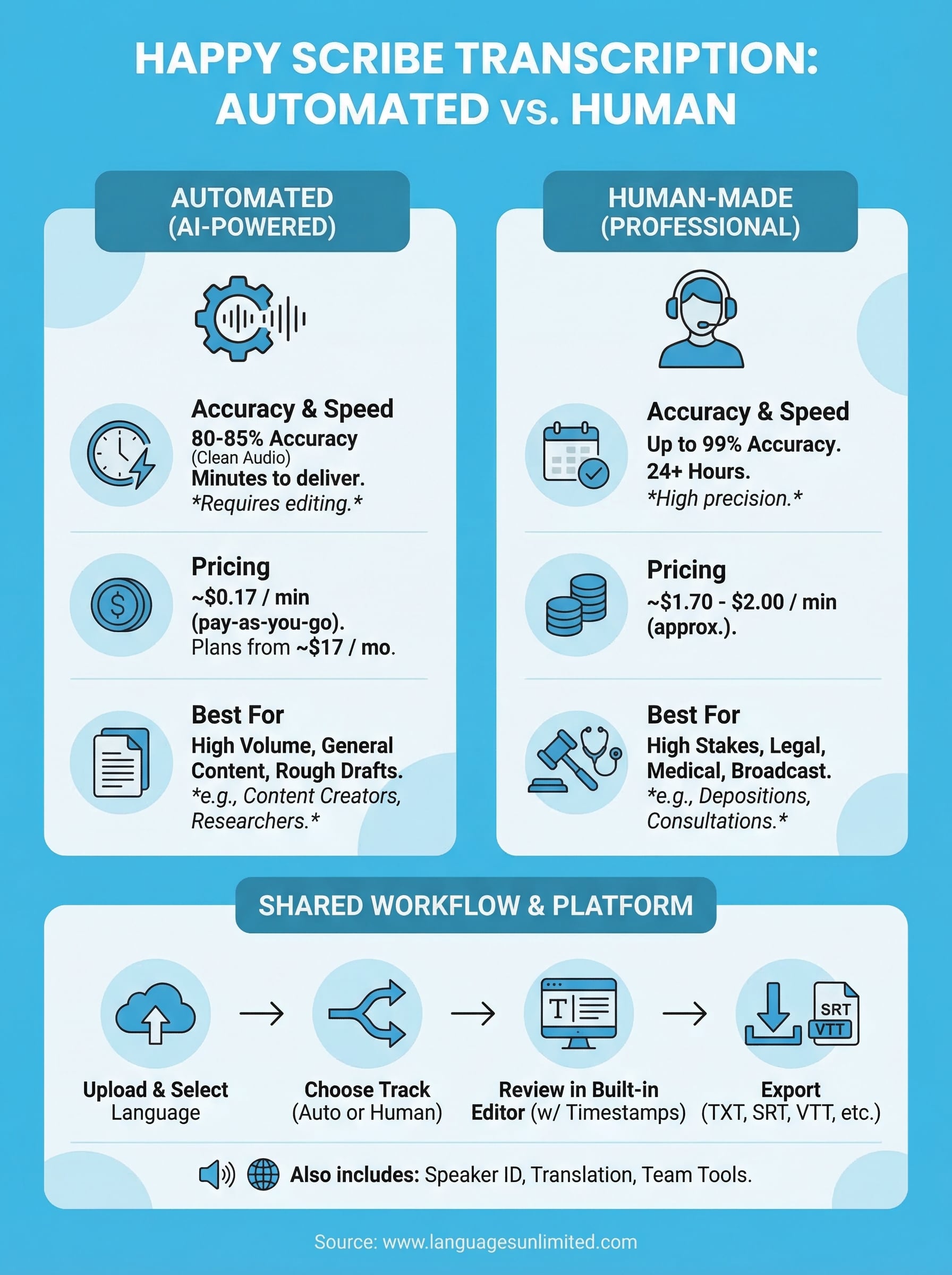
The automated option uses AI speech recognition to convert your uploaded audio or video into text. You upload a file, select your language, and the system delivers a transcript in a matter of minutes. Happy Scribe supports over 60 languages and dialects in its automated tier, which makes it a practical choice for multilingual content teams working at volume.
The speed advantage is real, but it comes with a trade-off: automated transcripts typically achieve 80 to 85 percent accuracy on clean audio, which means you’ll still need to review and correct the output before it’s usable in most professional contexts.
The platform includes a built-in editor that lets you play back the audio while you read and correct the text, with each word timestamp-linked so you can click directly to the moment it was spoken. This reduces editing time compared to working in a separate document, but it doesn’t eliminate editing altogether. Background noise, heavy accents, multiple speakers, and technical terminology all reduce accuracy, sometimes significantly.
Human transcription
If you need a cleaner result, human transcription is the other path. Happy Scribe connects you with a network of transcribers who work through the platform to produce manually reviewed, high-accuracy transcripts. The platform advertises up to 99 percent accuracy for human transcription, which reflects what you’d expect from a careful, experienced transcriber working with decent audio.
Human transcription takes longer, typically 24 hours or more depending on file length and language availability. You also pay considerably more per minute compared to the automated tier. For projects where every word counts, such as research interviews, broadcast content, or conference recordings you plan to publish, the accuracy improvement is often worth the wait and the extra cost.
Supported file types and extra features
Happy Scribe accepts a wide range of file formats, including MP3, MP4, WAV, MOV, and more. You can also import directly from a URL, which helps if your content lives on a hosting platform. Beyond transcription, the platform offers:
- Subtitle and caption export in formats like SRT and VTT
- Speaker identification to label different voices in the transcript
- Translation of transcripts into other languages after the transcription step is complete
- Team collaboration tools for shared access and editing
These features make it more than a simple transcription tool, though the core value still comes down to how well it handles your specific audio.
Happy Scribe pricing and what you actually pay
Happy Scribe uses two billing models: pay-as-you-go and subscription plans. Both cover automated and human transcription, but your choice of service track has a bigger impact on your total cost than which billing model you select.

Automated transcription cost
The pay-as-you-go rate for automated happy scribe transcription sits at roughly $0.17 per minute of audio. If you subscribe to a monthly plan, that per-minute cost drops and you receive a set number of minutes included each billing cycle. Subscription plans start at around $17 per month for a limited minute allowance and scale up depending on volume.
A one-hour recording costs approximately $10 at the standard pay-as-you-go rate, which adds up fast if you’re processing multiple files each week.
A free tier exists with a small number of trial minutes, which is enough to test the platform before committing. Keep in mind that unused minutes on most subscription plans do not roll over, so matching your plan size to your actual monthly volume matters if you want to avoid paying for minutes you never use.
Human transcription cost
Human transcription runs at roughly $1.70 to $2.00 per minute, depending on the language and turnaround requirements. That puts a one-hour recording between $102 and $120 before any add-ons or language surcharges. Less common languages may carry a higher rate or a longer delivery window due to limited transcriber availability.
For projects where accuracy is critical, that added cost is often justified. But if you’re transcribing routine content at volume, the human tier can strain a budget quickly. Most users start with automated transcription and only move to human review when the specific project demands a cleaner, more reliable result.
Accuracy, editing time, and when to use human vs AI
The accuracy you get from happy scribe transcription depends heavily on your audio quality. A clean recording with a single speaker in a quiet environment will score higher on the AI track than a multi-speaker interview recorded over a phone call. Knowing this upfront helps you set realistic expectations and plan your editing time before you start.
How accurate is AI transcription in practice
Happy Scribe’s automated tier claims 80 to 85 percent accuracy on clear audio, which sounds solid until you calculate what that means in practice. On a 60-minute recording, an 85 percent accuracy rate leaves you correcting roughly nine minutes worth of errors, and that editing work can take significantly longer than nine minutes depending on how complex those errors are.
Background noise, overlapping speakers, strong accents, and domain-specific vocabulary are the four most common reasons AI accuracy drops below the stated baseline.
Your actual editing time also depends on how familiar you are with the platform’s built-in editor. Most users report spending 20 to 40 percent of the original audio length on cleanup when working with automated transcripts, even on reasonably clean recordings.
When human transcription makes sense
Some projects leave no room for error, and those are exactly the ones where human transcription justifies the higher cost. Legal depositions, medical dictation, academic research interviews, and broadcast content all fall into this category. In each case, a single misheard word can change meaning in ways that carry real consequences.
You should also consider the human option when your audio includes multiple speakers, heavy accents, or technical terminology that AI models consistently mishandle. If you find yourself spending more time correcting an automated transcript than you would spend transcribing the audio yourself, the human track is almost always the faster path to a result you can actually use.
How to transcribe with Happy Scribe step by step
Getting started with happy scribe transcription takes less time than most people expect. The platform is built around a straightforward upload-and-edit workflow, so you don’t need any technical background to produce a usable transcript. That said, a few deliberate choices at each step will save you significant editing time later.
Create an account and upload your file
You’ll need to register for a free account before you can upload anything. Once you’re logged in, click "New Transcription" from your dashboard and select your file from your device or paste in a hosted URL. Happy Scribe accepts most common audio and video formats, so format conversion is rarely necessary.
Selecting the correct language before you submit is the single most important step in the upload process, because choosing the wrong language will produce an unusable result regardless of your audio quality.
After you choose your language, you’ll pick between automated and human transcription. Automated delivers results in minutes; human transcription takes up to 24 hours. Confirm your selection and submit the file. The platform will notify you when the transcript is ready.
Review, edit, and export
Once your transcript is ready, open it in the built-in editor. Each word in the transcript links to its timestamp in the audio, so you can click any word to jump directly to that moment in the recording. This makes catching errors faster than reading through a static document separately.
Work through the transcript top to bottom, correcting misheard words and adjusting speaker labels where needed. When you’re satisfied with the result, use the export menu to download your file. You can export as a plain text document, a Word file, or a subtitle format like SRT or VTT if you need captions for video.
Happy Scribe transcription jobs and pay basics
If you’re on the other side of the platform and looking for work rather than output, Happy Scribe transcription also operates as a marketplace where freelance transcribers take on paid assignments. The platform recruits transcribers regularly, and the application process is open to qualified candidates in supported language pairs. Before you apply, it helps to understand how the pay structure works and what the realistic earning potential looks like.
How the job application process works
Applying to transcribe for Happy Scribe starts with a short test to assess your accuracy and speed. You’ll transcribe a sample audio file, and the platform evaluates your output before granting access to available jobs. Passing the test is not guaranteed, and candidates who score below the threshold are typically asked to reapply after a waiting period.
The test is designed to filter for accuracy, so reviewing basic transcription conventions like punctuation placement and speaker labeling before you attempt it will improve your chances.
Once accepted, you access a job queue and select assignments based on language, length, and availability. There is no guaranteed minimum number of assignments, so income can vary week to week depending on what’s in the queue and how quickly you claim files.
What transcribers earn per minute
Pay rates for transcribers on Happy Scribe generally fall between $0.40 and $0.65 per audio minute, depending on the language and the complexity of the file. A one-hour audio file at the midpoint rate earns you roughly $30 before any platform fees or taxes. That rate is consistent with what other AI-assisted transcription platforms offer, though it sits below what fully independent professional transcription work tends to pay.
Speed matters significantly here. If you transcribe a 60-minute file in two hours, your effective hourly rate is roughly $15. Faster, more experienced transcribers who work with clean audio can push that number higher over time.
Next steps
Happy scribe transcription works well for a specific range of use cases, primarily content creators and researchers who need a fast, affordable draft they can clean up themselves. If your audio is clear, your subject matter is general, and some editing time fits your workflow, the platform delivers on what it promises. For high-volume, low-stakes projects, it’s a reasonable tool to have in your process.
But if your work sits in legal, medical, government, or academic territory, the accuracy and compliance standards that matter in those fields go beyond what an AI-powered platform consistently provides. That’s where professional transcription services become the right choice rather than a fallback. At Languages Unlimited, we’ve worked with clients in exactly those industries since 1994, and we bring the same precision to transcription that we apply across all of our language services. If your project demands that level of reliability, reach out to our team to discuss what we can do for you.