



Trint transcription is an AI-powered software that converts your audio and video files into written text automatically. You upload your recording, the system processes it using speech recognition technology, and you get a time-coded transcript you can edit and share with your team. Built specifically for journalists and media professionals, Trint handles interviews, podcasts, meetings, and other spoken content across more than 40 languages.
This guide breaks down everything you need to know about Trint transcription. You’ll learn how the platform works, what accuracy you can expect from its AI, how much it costs, and when it performs well versus when it struggles. We’ll walk through the actual workflow, compare it against other transcription tools, and help you figure out if Trint fits your needs or if you should look at alternatives. By the end, you’ll know exactly whether Trint transcription makes sense for your projects.
Why Trint transcription matters
Manual transcription eats up your time and slows down your entire content production workflow. You spend hours typing what speakers said in meetings, interviews, or recordings when you could be analyzing the information or creating your final deliverable. Trint transcription automates this process so you can get a first draft transcript in minutes instead of spending three or four hours per hour of audio. That time savings alone justifies the investment for most professional users who handle regular transcription work.
Speed and searchability transform how you work
Automated transcription gives you immediate access to spoken content in a format you can search, edit, and share. You type a keyword and jump straight to the exact moment someone mentioned a topic instead of scrubbing through hours of audio guessing where the information lives. Your entire archive becomes instantly searchable once you convert audio and video files to text. This searchability matters particularly if you work with large volumes of recorded content or need to reference past interviews and meetings regularly.
Transcription changes audio from a linear medium you must listen through sequentially into a searchable document you can navigate instantly.
Collaboration and workflow efficiency
Collaboration improves dramatically when you work with text instead of forcing team members to listen to raw audio. Your colleagues can review transcripts quickly, add comments to specific sections, and extract the quotes or data points they need without blocking their entire afternoon. Teams that depend on interviews, focus groups, or recorded meetings can distribute information faster and make decisions without waiting for everyone to listen to the same recording.
How to use Trint transcription
Trint transcription works through a straightforward web-based platform that requires no software installation on your computer. You access the service through your browser, upload your audio or video files, and let the AI handle the conversion while you focus on other tasks. The entire process from upload to edited transcript typically takes less time than the duration of your original recording, especially for files under an hour.
Create your account and upload files
Start by signing up for a Trint account at their website and choosing the plan that matches your transcription volume. Once you log in, you click the upload button on your dashboard and select files from your computer, or drag and drop them directly into the browser window. Trint accepts common formats like MP3, MP4, WAV, and MOV, so you won’t need to convert your files before uploading.
Before the transcription begins, you select the language spoken in your recording from the dropdown menu if automatic detection doesn’t suit your needs. For files with multiple speakers, you can enable speaker identification during the upload process. Your file uploads to Trint’s servers, and the AI starts transcribing immediately, usually completing in about half the time of your audio length.
The quality of your source audio directly impacts your transcript accuracy, so record in quiet environments with clear microphones whenever possible.
Edit and refine your transcript
Your completed transcript appears in Trint’s editor with text synchronized to your audio waveform. You click any word in the transcript and the audio jumps to that exact moment, letting you verify accuracy quickly. The editor highlights words as they play, so you can follow along and catch errors by listening and reading simultaneously.
Corrections happen inline by clicking any word and typing the replacement. You can also add custom terms to Trint’s dictionary if your content includes specialized vocabulary, names, or technical jargon that the AI consistently misses. Speaker labels can be edited or assigned throughout the transcript by clicking the speaker tags.
Export and share your results
After editing, you export your transcript in multiple formats including plain text, Word documents, PDFs, or subtitle files depending on your intended use. The export menu offers formatting options and the ability to include or exclude timestamps and speaker labels. You can also share transcripts directly from Trint by generating a secure link that gives collaborators view or edit access without requiring them to create accounts.
Trint transcription features and workflow
Trint transcription offers a complete suite of features designed specifically for media professionals who need more than basic speech-to-text conversion. The platform combines automated transcription with editorial tools, collaboration features, and content creation capabilities that transform raw recordings into publishable material. Understanding how these features work together helps you maximize efficiency and get the most value from your subscription, whether you handle a few files monthly or process dozens of interviews weekly.
AI-powered transcription and speaker detection
The core transcription engine processes your files using speech recognition technology trained on diverse voices, accents, and audio conditions. You get time-coded transcripts that sync each word to its position in the audio, making verification and editing faster than working with plain text documents. Speaker identification attempts to distinguish between different voices automatically, though accuracy depends heavily on audio quality and whether speakers leave clear pauses between turns.
Trint’s custom dictionary feature lets you add up to 100 specialized terms that the AI will recognize consistently across your projects. This proves particularly valuable if you regularly transcribe content with technical vocabulary, brand names, or industry-specific terminology that standard speech recognition typically mishears. The system learns these terms and applies them to future transcriptions, reducing your editing time on recurring projects.
Custom dictionaries cut your editing time dramatically when you work in specialized fields with unique terminology that general AI models consistently miss.
Story-building and collaboration tools
The story-building feature distinguishes Trint from basic transcription services by letting you combine clips from multiple files into a single narrative document. You select quotes, sections, or entire transcripts and arrange them in the order that serves your final piece, creating a script or article outline directly from your source material. Multiple team members can access the same story, add comments, and make edits simultaneously without version control conflicts.

Collaboration happens through shared links that give specific permissions (view-only or full editing access) to colleagues, clients, or contributors. Your team can highlight important sections, add notes for context, and mark segments for inclusion in the final deliverable without needing separate communication tools. These collaborative workflows work particularly well for newsrooms, research teams, and content marketing groups where multiple people contribute to projects built from interview material.
Translation and multilingual support
Trint supports transcription in over 40 languages and translation into more than 50 languages, letting you work with international content or repurpose recordings for global audiences. The automatic language detection identifies what language speakers use in your recording, though you can override this selection manually when needed. Translation happens after transcription completes, giving you both the original transcript and translated versions without re-uploading files.
Your translated transcripts maintain the time-code synchronization and formatting from the original, so you can verify translations against the source audio even if you don’t speak the language fluently. This multilingual capability makes Trint transcription suitable for organizations with international operations, researchers conducting cross-cultural studies, or content creators serving audiences in multiple regions.
Trint transcription accuracy explained
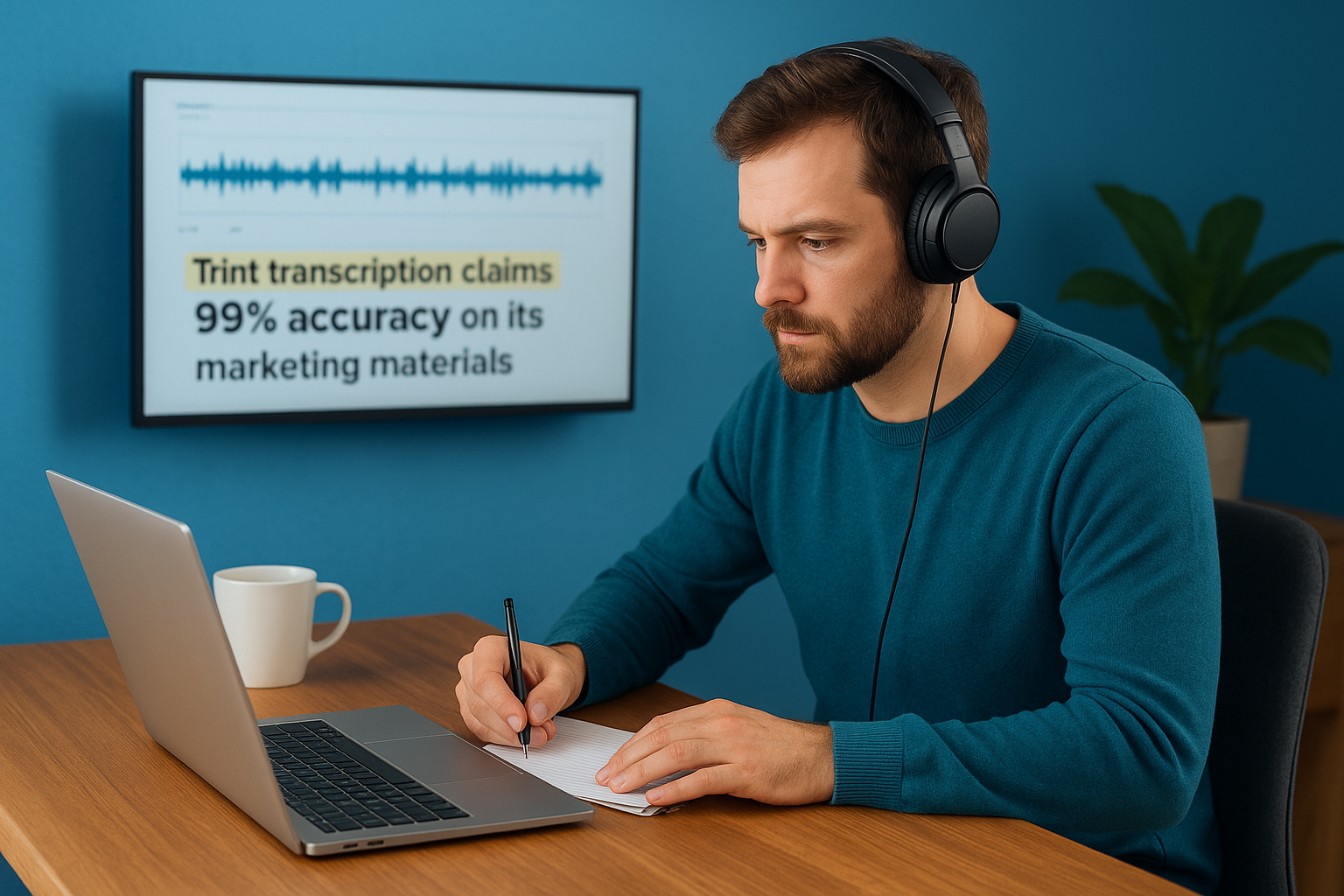
Trint transcription claims 99% accuracy on its marketing materials, but real-world testing consistently shows results closer to 87-90% accuracy depending on your audio conditions and content type. This gap between claimed and actual performance matters because you’ll spend more time editing than you expect if you plan workflows around perfect transcripts. Your actual accuracy depends on recording quality, speaker clarity, background noise levels, and whether your content includes specialized terminology or multiple speakers talking simultaneously.
What affects your transcript accuracy
Audio quality determines your accuracy more than any other single factor. Clear recordings made with dedicated microphones in quiet environments produce transcripts that need minimal editing, while poor audio with background noise, echo, or multiple sound sources generates transcripts requiring extensive corrections. You get better results when speakers articulate clearly, pause between thoughts, and avoid talking over each other.
Speaker characteristics also impact how well Trint transcription handles your files. Strong regional accents consistently cause more errors than standard American or British English, particularly when speakers pronounce words differently than the AI’s training data. Multiple speakers create additional challenges, especially during rapid exchanges or crosstalk where voices overlap. The system performs adequately when speakers leave clear pauses but struggles to assign dialogue correctly during dynamic conversations.
Recording conditions you control before transcription matter more for accuracy than any editing you do afterward.
How different content types perform
Content with specialized vocabulary shows inconsistent accuracy across industries and contexts. Testing reveals that Trint handles medical terminology surprisingly well, maintaining reasonable accuracy with technical terms and specific anatomical references. Marketing and business content with contextual language, applied principles, and industry buzzwords produces noticeably worse results because the AI struggles to interpret meaning from context clues.
The custom dictionary feature helps with recurring terminology but limits you to 100 terms, which proves insufficient for projects involving multiple specialties or extensive technical vocabularies. You must manually add each term, and the system won’t automatically learn from your corrections during editing sessions.
Practical accuracy expectations
Plan for 10-15 minutes of editing per hour of audio when working with good recording conditions and standard English speakers. That editing time doubles or triples when you transcribe content with heavy accents, multiple speakers, technical jargon, or poor audio quality. Your transcripts will contain punctuation errors, capitalization mistakes, and misinterpreted words that require human review before you can consider them publication-ready. The time savings compared to manual transcription remains substantial, but you cannot skip the verification and editing phase regardless of what accuracy percentage Trint advertises.
Trint transcription pricing and plans
Trint transcription uses a subscription-based pricing model that costs significantly more than many competing platforms, with plans starting at $80 per month for basic access. You choose between three main tiers depending on your transcription volume and feature needs, though the pricing structure includes limitations that make it less straightforward than it initially appears. Understanding exactly what you get at each level helps you avoid paying for a plan that doesn’t match your actual usage patterns or discovering hidden restrictions after you commit.
Starter plan for individuals
The Starter plan costs $80 per month or $52 per month if you pay annually, giving you access to transcribe seven files monthly. This file limit creates immediate questions because Trint doesn’t clearly define what counts as a file or whether duration matters when calculating your monthly allocation. You also lose access to translation capabilities at this tier, which eliminates one of Trint’s main differentiating features if you work with international content.
Additional limitations include restricted export options and a locked custom dictionary that prevents you from training the AI on your specialized vocabulary. These restrictions make the Starter plan suitable only for casual users with minimal transcription needs who never work with foreign languages or technical terminology. Your cost per file at the monthly rate comes to approximately $11.43, which proves expensive compared to pay-as-you-go alternatives.
Advanced plan limitations
The Advanced plan advertises unlimited transcription for $100 per month (or $60 monthly when billed annually), but Trint imposes an undisclosed fair-use cap that limits your daily uploads. You won’t find specifics about this cap on the pricing page, and the company only mentions it briefly in FAQ sections. This lack of transparency means you cannot accurately predict whether the plan supports your volume until you hit the restriction and discover your limitations firsthand.
Hidden usage caps on “unlimited” plans create workflow disruptions when you discover restrictions only after committing to a subscription.
Upgrading to Advanced makes sense primarily when you need the translation features and better export flexibility rather than truly unlimited volume. Your annual billing discount brings the monthly cost down to $60, making it the best value option if you regularly transcribe more than seven files monthly and require Trint’s full feature set.
Enterprise and trial options
Enterprise pricing requires you to contact Trint directly for a custom quote based on your organization’s needs, team size, and feature requirements. This tier adds API access, dedicated account management, and live transcription capabilities that the other plans exclude. Organizations needing Section 508 compliance, advanced security features, or integration with proprietary systems typically require the Enterprise plan.
Trint offers a seven-day free trial that limits you to three files, giving you minimal opportunity to test accuracy with your actual content types before committing. This restricted trial proves insufficient for evaluating whether Trint transcription handles your specific audio conditions, accents, or terminology adequately.
When Trint works well and when it does not
Trint transcription performs best with specific types of content and recording conditions while struggling significantly with others. Understanding these patterns helps you decide whether your projects fit the platform’s strengths or if you should expect extensive editing time. Your success with Trint depends largely on matching your content characteristics to situations where the AI excels rather than forcing it to handle scenarios where it consistently underperforms.
Ideal conditions for Trint transcription
Professional media content recorded in controlled environments represents Trint’s sweet spot. You get strong accuracy with podcast interviews recorded through quality microphones where speakers take clear turns without overlapping. Single-speaker presentations, prepared remarks, and narration work produces transcripts that need minimal corrections because the AI handles predictable speech patterns effectively.
Clear English accents from American or British speakers deliver the best results, particularly when speakers articulate carefully and avoid rapid-fire delivery. Journalistic interviews conducted one-on-one give Trint exactly the kind of structured audio it handles well, with distinct speaker changes and professional recording quality. Your transcripts from these scenarios typically require only 10-15 minutes of editing per hour of audio.
Professional recording environments with clear speech patterns and distinct speakers give you transcripts that need minimal editing before publication.
Content with straightforward vocabulary and standard grammar works better than specialized material. You get reasonable accuracy with general business discussions, straightforward news reporting, and conversational content that doesn’t rely heavily on context or technical terminology.
Situations where Trint struggles
Multi-speaker environments with crosstalk create significant challenges that dramatically increase your editing time. Group meetings where participants interrupt each other or talk simultaneously produce transcripts with misattributed dialogue and missing segments. The speaker identification feature fails consistently during rapid exchanges, forcing you to manually reassign entire conversation blocks.
Heavy regional accents and non-native English speakers generate substantially more errors than standard accents. Technical content across most industries produces inconsistent results, with accuracy varying wildly based on how contextual versus factual your material is. Marketing discussions with industry buzzwords, applied concepts, and creative language consistently perform worse than medical content with concrete terminology.
Poor audio quality magnifies every other challenge. Background noise, echo, multiple sound sources, or phone recordings multiply your error rate regardless of speaker quality or content type. Distance from the microphone, inconsistent volume levels, or compression artifacts from video conferencing platforms all degrade accuracy beyond what editing can reasonably fix.
Best Trint alternatives for transcription
Several transcription platforms offer different strengths than Trint transcription, whether you need better pricing models, higher accuracy, or more flexible features. Your choice depends on your specific requirements around accuracy needs, budget constraints, integration preferences, and whether you prioritize AI speed or human precision. Comparing alternatives helps you find the right balance between cost efficiency and transcript quality for your particular workflow and content types.
AI-powered transcription platforms
Otter AI provides a more affordable option with strong integration capabilities directly into Google Meet and Microsoft Teams, eliminating the need for separate uploads. You get real-time transcription during meetings with automatic speaker identification that performs better during rapid exchanges than Trint. The platform starts with a free tier that gives you 300 monthly minutes and costs $16.99 monthly for the Pro plan or $10 monthly when billed annually, making it substantially cheaper than Trint’s entry point. Otter includes meeting summaries, action item detection, and collaboration features that Trint lacks, though its language support covers fewer options than Trint’s 40-plus languages.
Rev offers both AI transcription and human-powered services depending on your accuracy requirements and budget flexibility. The AI subscription starts at $29.99 monthly for 1,200 minutes and delivers roughly 90% accuracy similar to Trint’s real-world performance. You can upgrade to human transcription at $1.50 per minute when you need guaranteed accuracy for legal depositions, academic research, or medical documentation where errors create serious consequences. Rev’s flexibility lets you choose your accuracy level per project rather than committing to one service type.
AI transcription works well for speed and volume, but human transcription remains necessary when accuracy cannot be compromised.
Professional transcription services
Human transcription services deliver 99% accuracy consistently because trained professionals handle your files instead of relying solely on AI algorithms. Professional services like Languages Unlimited provide certified transcription that meets legal and medical standards, includes proper formatting for official documents, and handles specialized terminology that AI consistently misses. You pay more per minute than automated services, but you eliminate the editing time that AI transcripts require and get results suitable for court proceedings, regulatory compliance, or publication without additional verification.
These services excel when you work with poor audio quality, heavy accents, multiple speakers, or technical content where accuracy matters more than turnaround speed. Professional transcriptionists apply contextual understanding that AI lacks, correctly interpret ambiguous statements, and format documents according to industry standards. Your transcripts arrive ready for immediate use without the 10-15 minutes of editing per hour that Trint and other AI platforms require even under ideal conditions.
Key takeaways and next steps
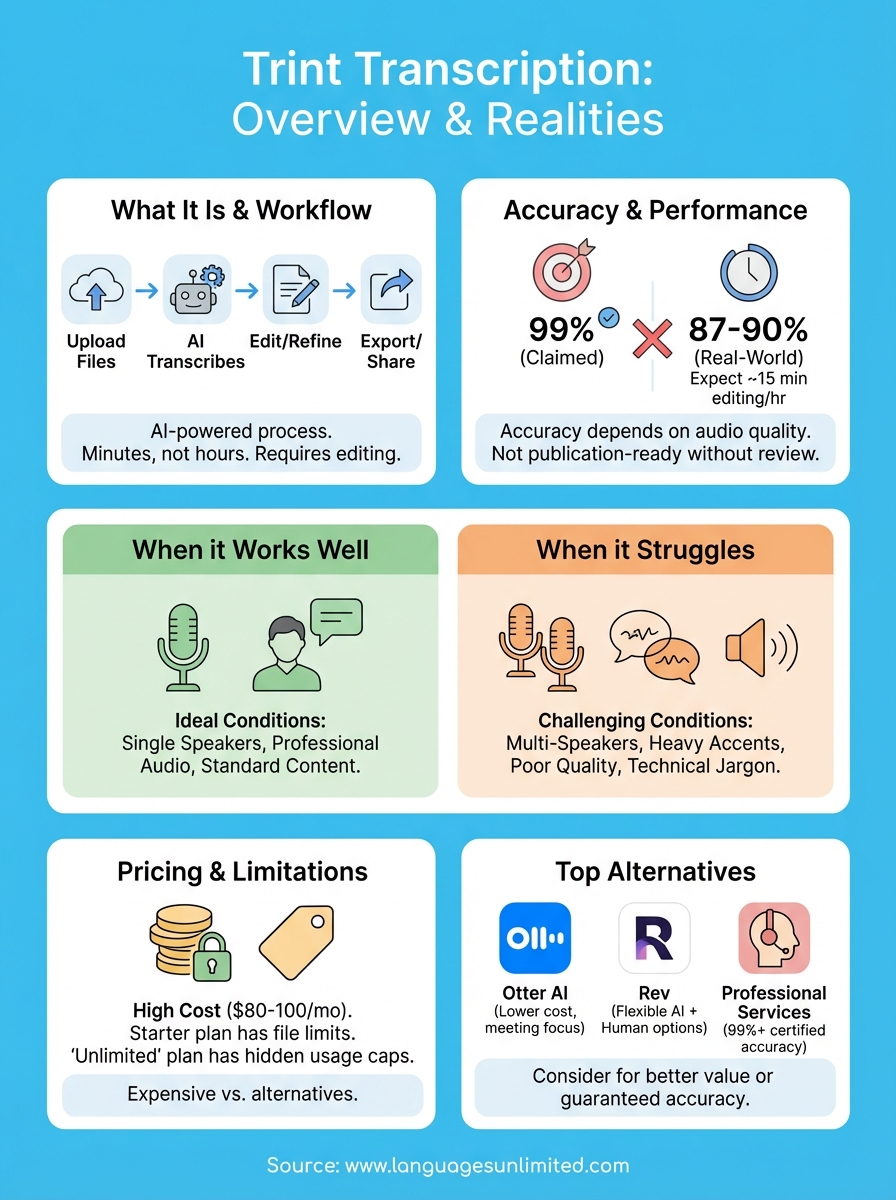
Trint transcription delivers automated speech-to-text conversion that works well for professional media content recorded in controlled environments but struggles with poor audio, heavy accents, and multiple speakers. You can expect 87-90% accuracy in real-world conditions rather than the advertised 99%, meaning you’ll spend 10-15 minutes editing per hour of audio even with good recordings. The platform costs $80-100 monthly with limitations that make it expensive compared to alternatives, particularly given the undisclosed usage caps on the “unlimited” plan.
Your decision depends on whether your content matches Trint’s strengths: clear single speakers, professional recording quality, and straightforward vocabulary. If you work with technical content, difficult audio conditions, or need guaranteed accuracy for legal or medical purposes, professional transcription services provide better results. Contact Languages Unlimited for certified transcription that eliminates editing time and delivers publication-ready accuracy on your first pass.