



You built a solid app for your home market. Now you need to reach users who speak different languages, write right to left, or use date formats you never considered. But when you dig into the code, you realize text is hardcoded everywhere, layouts break with longer strings, and your team has no clear process for managing translations. Fixing these issues after launch means weeks of rework and frustrated users in new markets.
This guide walks you through 12 proven software localization best practices that prevent these problems before they start. You’ll learn how to structure your code for multiple languages, work with professional translators, automate your workflow, and test everything properly. Each tip includes practical examples and explains what to do now so your app works smoothly in every language you support. By the end, you’ll have a clear roadmap for building software that users anywhere can actually use.
1. Build a pro localization team
You cannot treat localization as a side project for one developer who already has a full workload. Your product will miss deadlines, mistakes will pile up, and you’ll lose momentum when urgent tasks pull attention away. Building a dedicated team from the start keeps your localization process moving forward and ensures every language version meets the same quality standards as your source product.
Why you need a dedicated localization team
A strong localization team includes at least two internal developers who understand internationalization patterns, plus external partners who handle translation, cultural adaptation, and testing. This structure lets your internal team focus on code architecture and workflow automation, while your partners bring linguistic expertise and regional knowledge. You also need someone to coordinate between developers, translators, and stakeholders, making sure strings get extracted, translated, reviewed, and shipped on schedule.
Assigning just one person to handle localization creates a bottleneck that delays every release and increases costs when problems surface late.
How to work with Languages Unlimited as a partner
Languages Unlimited brings over ten thousand translators and interpreters who cover legal, medical, and technical content across all major languages. Their team handles certified translations for documents, provides real time interpretation for product launches, and offers consultation for complex projects that span multiple regions. You send them your resource files and context, they manage the translation workflow, and you receive ready to integrate localized content that meets industry standards.
Including accessibility and compliance expertise
Your localization team should include specialists who understand Section 508 compliance, WCAG guidelines, and regional accessibility laws. Languages Unlimited provides CART services, captioning, and subtitling that keep your software accessible to users with hearing impairments, plus consultation on building interfaces that work with assistive technologies in different languages.
2. Internationalize from day one
Internationalization means preparing your codebase to handle multiple languages and regions before you write a single line of translation. When you build with i18n in mind from the start, you avoid costly rewrites later. Refactoring an entire application to support new locales after launch can take months of developer time and often breaks existing features. Starting with proper internationalization is one of the most important software localization best practices you can follow.
What internationalization changes in your codebase
Internationalization touches every layer of your application, from how you store text in your database to how your UI renders content. You need to structure your code so that language specific strings live outside your source files, date and number formatting adjusts automatically based on locale, and your layout adapts to text that grows or shrinks. Your database must support Unicode character encoding to handle scripts from Arabic to Chinese. Front end frameworks need locale aware libraries for formatting, and your API should accept and return locale parameters with every request.
Core i18n tasks to tackle early
Your first priority is setting up a locale management system that determines which language and region each user sees. This means storing a locale preference for every user and implementing fallback logic when a translation is missing. You also need to externalize all visible text into resource files and replace hardcoded strings with function calls that fetch the right translation. Make sure your layouts use flexible containers that adjust to different text lengths, and configure your environment to support UTF-8 everywhere.
Building internationalization into your architecture from the beginning saves weeks of refactoring and prevents bugs that only appear in certain languages.
Common i18n mistakes to avoid
Developers often assume English sentence structure works in all languages and build concatenated strings that break when word order changes. Another mistake is hardcoding date formats or currency symbols instead of using locale specific formatting functions. You should never store translated text directly in your database alongside data, mix user generated content with UI strings, or forget to plan for right to left languages.
3. Externalize and structure resource files
Your resource files hold every piece of text users see in your application. When these files are organized well, translators can work efficiently and your developers can maintain the codebase without breaking translations. Poor organization leads to duplicate strings, missing context, and translations that drift out of sync with your source language. Following software localization best practices for file structure saves time and prevents errors across all your language versions.
How to externalize all user facing strings
You need to identify every string that appears in your UI and move it into external resource files. This includes button labels, menu items, error messages, tooltips, placeholder text, and notification copy. Replace each hardcoded string in your source code with a function call that fetches the translated value based on the current locale. Your resource files should use a standard format like JSON, YAML, XML, or gettext PO files depending on your framework. Keep these files separate from your business logic so translators can work on them independently without touching your code.
Moving all visible text into resource files lets you update translations without recompiling your application and makes version control easier.
Structuring keys, namespaces, and file layouts
Your key names should describe the purpose and location of each string rather than just repeating the English text. Use namespaces to group related strings by feature, screen, or component so files stay organized as your application grows. For example, structure keys like dashboard.welcome_message or settings.profile.save_button instead of generic names like text1 or string_abc. This makes it obvious what each string controls and prevents duplicate entries.
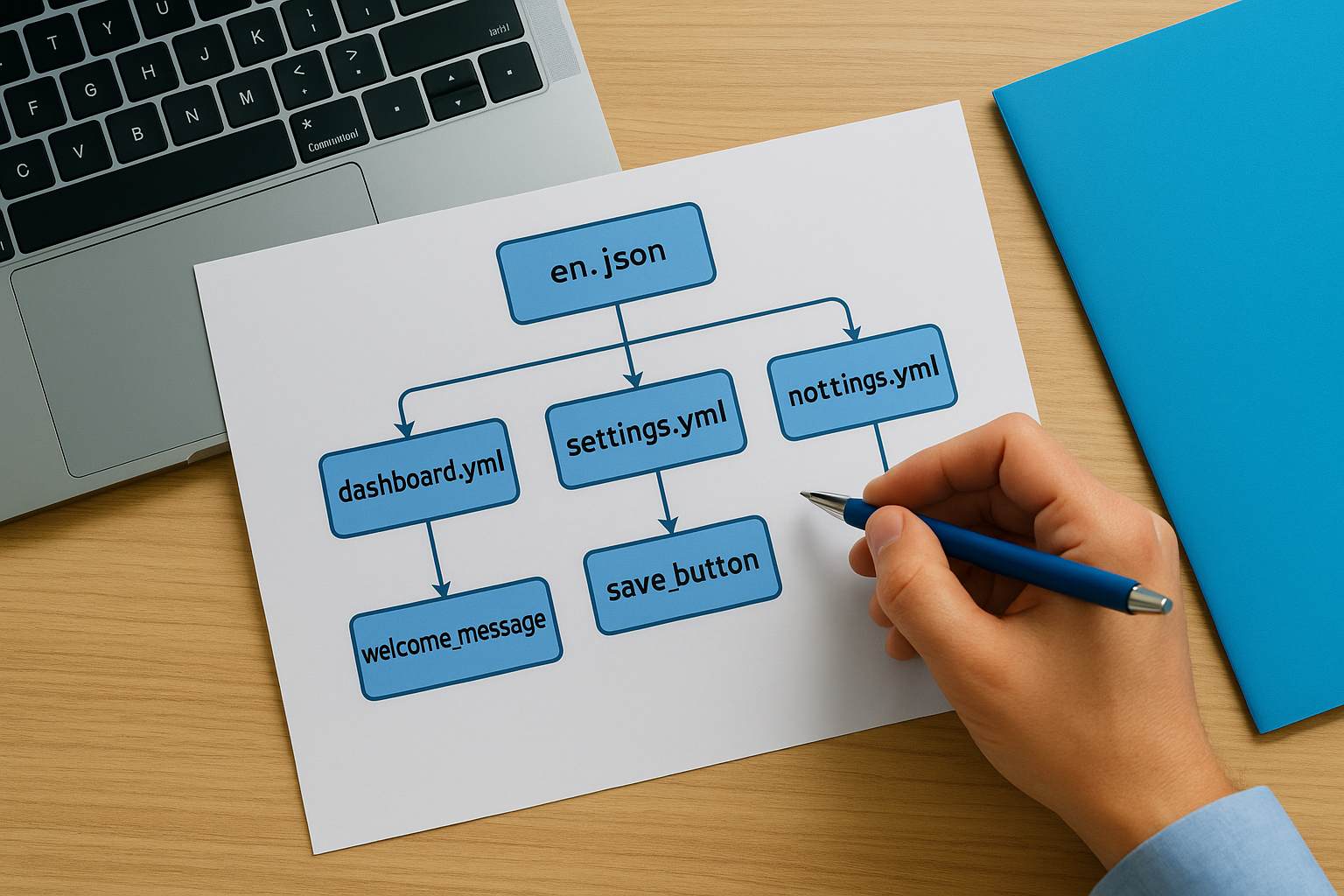
Managing resource files in source control
Store your resource files in the same repository as your source code so every commit includes both code changes and any new strings that need translation. Use branches to manage translations in progress and merge completed work back to your main branch following your standard workflow. Tag your resource files with version numbers or commit hashes to track which translations match which release.
4. Avoid concatenation and design for expansion
Concatenated strings and fixed layouts cause immediate problems when you translate your software. English sentences that you build by combining smaller pieces rarely work in other languages because word order, grammar rules, and text length change dramatically across regions. Your developers might think splitting strings saves time, but this approach creates puzzles that translators cannot solve and layouts that break when text expands or contracts.
Why concatenated strings break translations
Building sentences from fragments assumes every language follows English grammar, which is false. When you concatenate "You have" plus a number plus "new messages," translators cannot rearrange those pieces to match their language structure. Some languages need different verb forms based on the subject, others place the verb at the end, and many require gender agreement between nouns and adjectives. You must provide complete sentences with placeholders so translators control the entire structure.
Giving translators full sentences with flexible placeholders lets them create natural translations that follow their language rules instead of English syntax.
Designing layouts for text growth and shrinkage
Text in German or Finnish often expands 30 to 50 percent compared to English, while Chinese contracts significantly. Your layouts need flexible containers that adjust to different text lengths without overlapping controls or cutting off words. Use grid systems and relative positioning instead of fixed pixel widths, leave extra whitespace around buttons, and test your designs with longer sample text before sending files to translators.
Handling plurals, gender, and variables safely
Different languages have multiple plural forms based on quantity, not just singular and plural. Russian uses different forms for 1 item, 2 to 4 items, and 5 or more items. Your code needs plural handling functions that support these rules. Gender inflection affects verbs, adjectives, and articles in many languages, so your variables must carry gender information when needed.
5. Use locale aware formatting
Numbers, dates, times, and currencies display differently across regions, and hardcoding formats breaks user experience in most markets. Your application needs to detect each user’s locale and format values according to their regional conventions automatically. When you skip this step, users see confusing or incorrect information that damages trust in your product. Implementing locale aware formatting is one of the most visible software localization best practices that directly affects how professional your application appears to international users.
Handling dates, times, numbers, and currencies
Your code must format dates, times, numbers, and currencies based on the user’s locale settings rather than a single hardcoded standard. Americans expect dates as MM/DD/YYYY while Europeans use DD/MM/YYYY, and ISO 8601 formats work best for technical contexts and data exchange. Time formatting varies between 12 hour and 24 hour clocks, decimal separators change from periods to commas, and currency symbols move before or after amounts depending on the region.

Using locale specific formatting libraries prevents the confusion that occurs when users cannot tell if 03/04/2026 means March 4 or April 3.
Managing locales rather than just languages
You need to track both language and country for each user because French speakers in France, Canada, and Belgium use different conventions. Store full locale codes like en-US, fr-CA, or pt-BR instead of just language tags. Your application should detect the user’s locale preference automatically from browser settings or system preferences and allow manual overrides in account settings.
Tools to format values correctly for each region
Modern frameworks include built in internationalization libraries that handle locale aware formatting automatically. JavaScript provides the Intl object, Python offers the locale and babel packages, and Java includes NumberFormat and DateFormat classes. These tools pull formatting rules from standardized locale databases maintained by Unicode CLDR, ensuring your application displays values correctly without manual configuration for every region.
6. Build glossaries and style guides
Your translators need clear reference materials to maintain consistency across all languages. Without a glossary and style guide, different translators working on your project will make conflicting choices about terminology, tone, and formatting. These inconsistencies confuse users and make your software appear unprofessional and poorly localized. Creating comprehensive language assets before you start translation prevents these problems and speeds up the entire localization workflow.
What to include in your localization glossary
Your glossary should list every product specific term, brand name, and technical phrase that appears in your software. Include the approved translation for each term in every target language, plus notes about when and how to use each entry. Document acronyms, feature names, menu labels, and any terms that should remain untranslated because they function as proper nouns or technical identifiers.
How to create a clear style guide for translators
Your style guide defines tone, formality level, and grammar preferences for each target language. Specify whether translations should use formal or informal pronouns, how to handle gender neutral language, and formatting rules for numbers, dates, and lists. Include examples that show your preferred voice and sentence structure, plus any cultural considerations that affect how you present content in specific regions.
A detailed style guide ensures every translator working on your project produces translations that sound like they came from the same voice.
Reviewing and updating language assets regularly
You need to review and update your glossary and style guide after every major release that introduces new features or terminology. Schedule quarterly reviews with your translation team to catch inconsistencies, add new entries, and refine guidelines based on user feedback from each locale.
7. Choose the right localization tools
Your localization workflow needs a translation management system that connects your codebase, translators, and reviewers in one platform. Emailing spreadsheets back and forth creates version control problems, makes it impossible to track changes, and wastes time on manual file conversions. The right tools automate repetitive tasks, maintain translation memory, and integrate directly with your development workflow so localization keeps pace with your release schedule.
Features to look for in a localization platform
Your platform should support all the file formats your project uses, from JSON and YAML to gettext and XLIFF, and convert between them automatically. You need built in translation memory that reuses previous translations, terminology management for glossaries, and quality checks that flag missing variables or incorrect placeholders. Look for collaboration features that let translators ask questions, reviewers leave feedback, and project managers track progress across all languages simultaneously.
Connecting your TMS to design and code repos
Integration with your version control system lets your platform detect new strings automatically and push completed translations back to the right branch. You should connect your translation management system to GitHub, GitLab, or Bitbucket so every pull request includes the latest localized content. Design tool plugins for Figma or Sketch let you preview translations in context before developers write code.
When to move beyond email and spreadsheets
You need professional tools when your project grows beyond a few hundred strings or you support more than three languages. Manual workflows break down when multiple translators work simultaneously, updates happen frequently, or you need to maintain consistent terminology across platforms. These software localization best practices require automation that spreadsheets cannot provide.
Professional translation management systems eliminate the version conflicts and lost work that plague manual localization workflows.
8. Support all scripts and directions
Your software needs to handle writing systems that work completely differently from Latin alphabets. Arabic and Hebrew run right to left, traditional Mongolian flows vertically, and languages like Thai combine multiple characters into single glyphs. When you ignore these requirements, your interface breaks for millions of potential users. Supporting diverse scripts and text directions properly demonstrates that you follow software localization best practices and respect users in every region.
Planning for Unicode and complex scripts
You must configure UTF-8 encoding across your entire stack, from database tables to HTTP headers and application code. This ensures your software can store and display characters from any writing system without corruption. Languages like Tamil, Devanagari, and Arabic require complex text shaping where character appearance changes based on surrounding letters. Your rendering engine needs to support these contextual forms and ligatures automatically, which most modern frameworks handle through built-in text layout libraries.
Designing for right to left and bidirectional text
Layouts need mirrored interfaces for languages like Arabic and Hebrew, where text flows from right to left but numbers and embedded English terms still flow left to right. This bidirectional text creates alignment challenges that you solve by using CSS properties like direction: rtl and unicode-bidi. Test every screen with real right to left content to catch alignment problems, icon positioning issues, and navigation elements that appear on the wrong side.
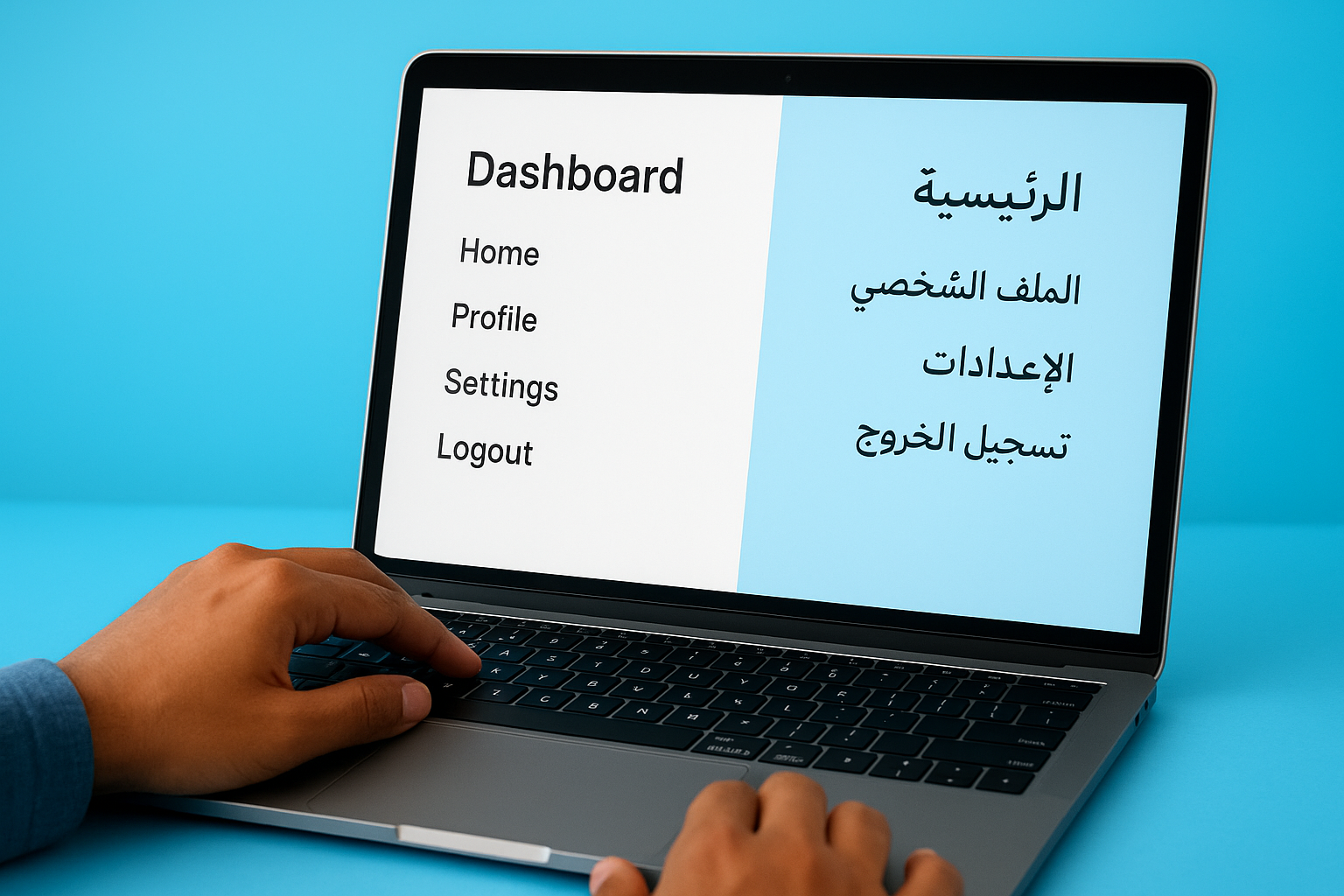
Proper right to left support requires more than flipping your interface horizontally because numbers, technical terms, and mixed language content need special handling.
Dealing with fonts, line breaks, and input methods
You need to select web safe fonts that include full character sets for every script you support or bundle custom fonts that cover all required glyphs. Different writing systems have unique line breaking rules where Chinese and Japanese allow breaks between any characters while Thai requires dictionary based word boundary detection. Input methods for languages like Chinese and Japanese let users type phonetically then select from multiple character options, so your forms must accommodate these complex input sequences without validation errors.
9. Give translators full context
Translators working on your software cannot see the actual interface where their text will appear. They work with lists of strings in files or translation platforms, often without knowing whether a term is a button label, error message, or page title. This lack of context leads to incorrect translations that fit grammatically but make no sense in your application. Providing comprehensive context information turns guesswork into informed decisions and produces translations that work correctly the first time.
Providing translators with rich context
You need to supply screenshots showing each string in its actual location, descriptions of what happens when users click buttons or see messages, and character limits for fields with space constraints. Include notes about tone, formality level, and any cultural sensitivities that affect word choice. Your platform should let translators see related strings together so they understand how different pieces connect, and you should explain what variables represent when strings contain placeholders.
Translators who understand where and how text appears in your interface make better word choices that fit both the space and the user’s mental model.
Naming keys so intent is obvious
Your string identifiers should describe the element’s function and location rather than repeating the English text or using meaningless codes. Names like checkout_button_complete_purchase tell translators exactly what they are working on, while keys like str_042 or generic_button_text provide no guidance. This naming approach follows essential software localization best practices and reduces the number of questions translators need to ask.
Avoiding text embedded in images and media
Text burned into graphics creates massive localization problems because you must recreate the entire image for every language. Your designs should separate text into overlay layers that you can replace independently, or eliminate text from images completely by placing captions nearby. Videos need external subtitle files rather than hardcoded text, and icons should communicate meaning visually without relying on letters or words.
10. Automate and integrate localization
Manual localization processes create bottlenecks that slow down every product release and increase the risk of shipping incomplete translations. Your team spends hours copying files between systems, notifying translators about updates, and checking whether all languages are ready before each deployment. Automation eliminates these repetitive tasks and connects your localization workflow directly to your development pipeline so translations stay synchronized with code changes automatically.
Setting up continuous localization in pipelines
Your continuous integration system should trigger localization tasks automatically when developers commit code containing new or modified strings. Configure your pipeline to extract updated content from resource files, send changes to your translation management system, and notify translators that new work is available. This integration ensures translations happen in parallel with development rather than blocking releases at the end of each sprint.
Connecting localization to your CI/CD pipeline turns translation from a manual bottleneck into an automated step that runs alongside your regular build process.
Automating string extraction and file sync
You need scripts that scan your codebase for new translatable strings, extract them into your standard resource file format, and push updates to your translation platform without manual intervention. Your automation should handle bidirectional sync so completed translations flow back into the correct branch automatically. Set up validation checks that prevent commits when resource files contain errors like duplicate keys or malformed placeholders.
Defining review and release workflows
Your workflow automation must route completed translations through quality review before merging them into production branches. Configure approval gates that require linguist sign off, define which roles can publish translations for each language, and establish rollback procedures when issues surface after deployment. These software localization best practices ensure every localized release meets your quality standards without manual coordination between multiple teams.
11. Test localization early and often
Testing catches localization problems before users encounter them in production. You cannot wait until all translations are complete to start testing because issues with layout, encoding, and functionality need fixes that affect your entire codebase. Early and frequent testing prevents expensive rework and ensures every language version works as well as your source product. This approach represents one of the most critical software localization best practices that separates successful global launches from failed ones.
Using pseudolocalization before real translation
Pseudolocalization lets you simulate translated content using modified English strings that contain special characters, expanded text, and formatting that mimics real translations. You run your application with these fake translations to spot layout breaks, encoding problems, and hardcoded strings before paying for actual translation work. This testing method reveals whether your interface accommodates text that grows by 30 percent, displays correctly with accented characters, and handles right to left text direction.

Testing with pseudolocalization surfaces internationalization bugs when they are cheapest to fix, before real translations complicate debugging.
Building functional and linguistic test plans
Your functional tests verify that every feature works correctly in each target language by checking forms, navigation, search, and data processing with localized inputs. Linguistic testing confirms that translations make sense in context, fit within their containers, and maintain consistent terminology throughout the interface. You need test cases that cover edge conditions like maximum text length, mixed direction content, and locale specific formats for dates and numbers.
Closing the loop on bugs with your language team
Bugs discovered during localization testing require coordination between developers and translators to determine whether the problem stems from code, translation, or design. Your workflow should route issues to the right team immediately and track fixes through verification in each affected language. Establish clear channels for translators to report problems they notice during their work and incorporate their feedback into your testing process.
12. Measure results and iterate
Your localization work does not end when you ship translated content. You need data driven insights that show how each localized version performs and where users encounter problems. Tracking the right metrics lets you identify which markets need more investment, which translations cause confusion, and how your localization process affects business outcomes. This continuous measurement and refinement approach ensures your software localization best practices evolve based on real user behavior rather than assumptions.
Metrics to track for localized releases
You should monitor adoption rates, engagement levels, and conversion metrics for each language version separately. Track how long users spend in your application per locale, which features see the most use in different regions, and where drop off occurs in localized flows. Measure support ticket volume by language to identify translation problems that create user confusion, and compare error rates across locales to catch technical issues specific to certain regions.
Gathering user feedback from each locale
Your feedback collection needs dedicated channels for users in each language so they can report problems in their native tongue. Set up locale specific surveys that ask about translation quality, cultural appropriateness, and whether content makes sense in context. Monitor app store reviews, social media mentions, and customer support conversations for patterns that indicate localization issues in specific markets.
Analyzing feedback from users in each locale reveals translation problems and cultural mismatches that metrics alone cannot detect.
Planning roadmap and budget for ongoing updates
You need quarterly reviews of localization performance that inform budget allocation and resource planning for the next period. Prioritize markets where metrics show strong growth potential or where user feedback indicates quality problems. Allocate budget for updating translations when your product changes, expanding into new regions, and maintaining language assets like glossaries and style guides.
Next steps
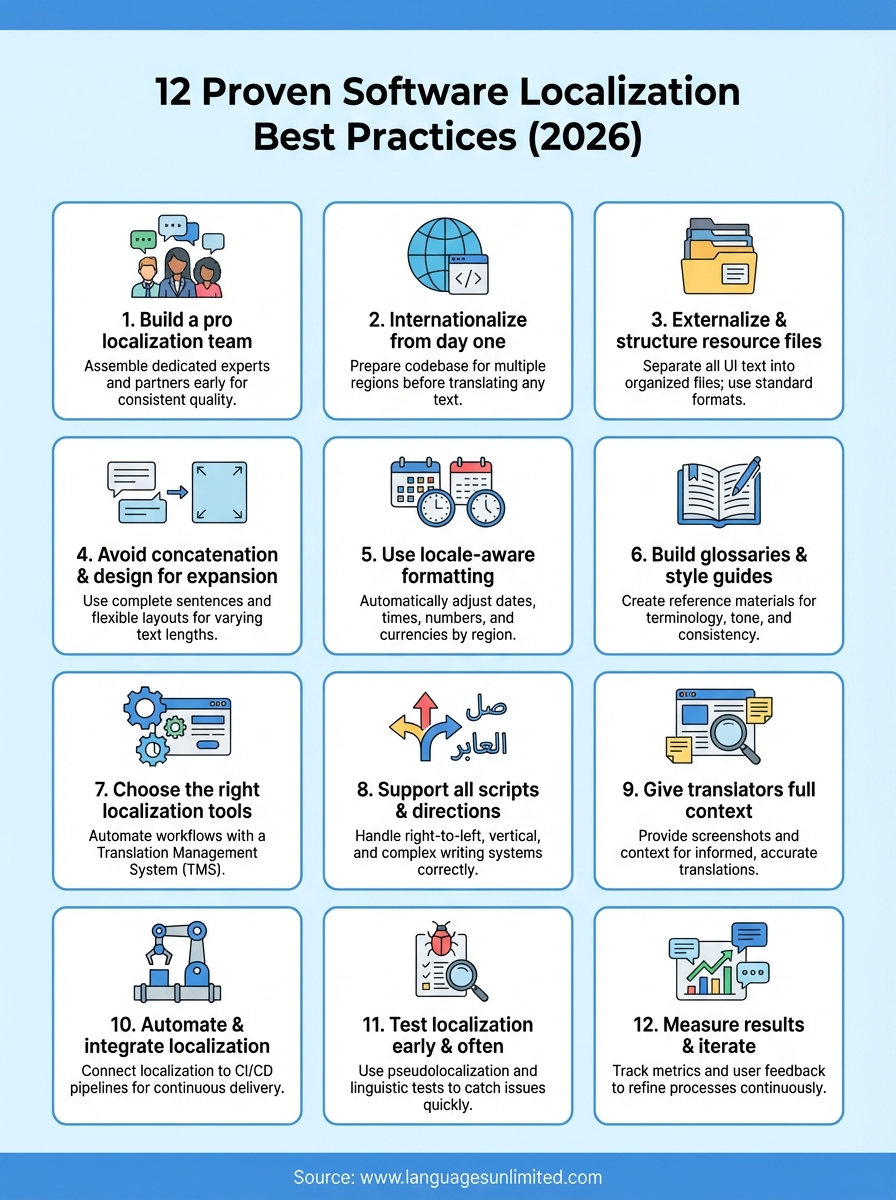
You now have 12 proven software localization best practices that cover everything from building your team to measuring results. These strategies prevent the costly mistakes that force complete rewrites and help you launch in new markets faster. Your next move depends on where your project stands today.
If you already have software that needs localization, start with an internationalization audit to identify problems in your current codebase. For new projects, implement these practices from the first sprint so you avoid rework later. Either way, you need professional translation partners who understand both the technical and linguistic sides of software localization.
Languages Unlimited provides certified translations, native speaker expertise, and consultation for complex localization projects across all major languages. Their team handles everything from resource file translation to accessibility compliance for software products. Contact Languages Unlimited to discuss your software localization needs and get a customized plan that fits your timeline and budget.