



Sonix transcription converts your audio and video files into searchable text using automated speech recognition technology. The platform handles 40+ languages and delivers transcripts in minutes rather than days. You upload your file, select your language, and Sonix processes everything through its AI engine.
This guide covers everything you need to evaluate Sonix for your transcription needs. You’ll see actual pricing structures with Standard and Premium plans, learn how accuracy compares across different audio quality levels, and discover how the Zoom integration captures meeting recordings automatically. We’ll also walk through the core features like timestamped editing, translation options, and export formats. By the end, you’ll know whether Sonix fits your budget and requirements, or if you need human transcription for specialized content. The information comes from real testing and user feedback across legal, medical, and business applications.
Why Sonix transcription matters
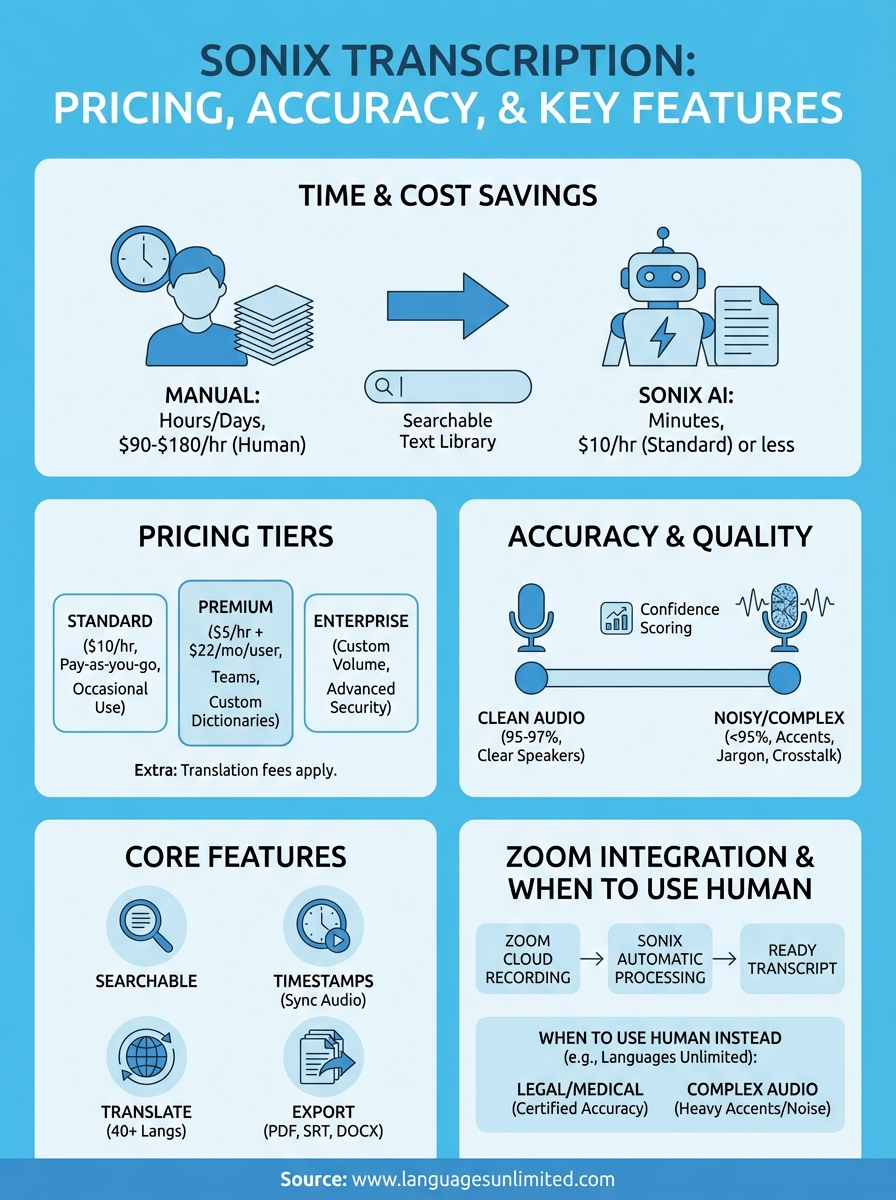
You spend hours replaying recordings just to find one quote or detail when you rely on manual note-taking. Sonix transcription eliminates that problem by converting your entire audio library into searchable text that you can ctrl+F through in seconds. Professional transcriptionists charge $1.50 to $3.00 per minute, which means a one-hour meeting costs $90 to $180, and you wait 24 to 48 hours for results. Sonix processes the same file for $10 in about 10 minutes.

Manual transcription takes 4 to 6 times longer than the original recording length, while automated tools deliver results in minutes.
Time savings over manual transcription
Your team reclaims hundreds of hours annually when you automate transcription work. A typical knowledge worker attends 12 meetings per week, and manually transcribing even half of those takes 24+ hours of work. Sonix handles this volume automatically, freeing your staff to analyze content instead of typing it. Legal teams use those saved hours for case research, while medical professionals redirect time to patient care.
Cost efficiency for teams
Organizations processing high volumes of audio see immediate budget relief with Sonix. If you transcribe 20 hours of content monthly, traditional services cost $1,800 to $3,600, whereas Sonix charges $200 under the Standard plan. The Premium plan adds team collaboration and custom dictionaries for $22 per user monthly plus $5 per hour. Your ROI becomes clear after the first month when you compare these figures.
Searchability transforms workflows
Sonix converts your media library into a searchable knowledge base that you can query instantly. You type a keyword and find every instance across all your transcripts, complete with timestamps that jump directly to the spoken moment. Marketing teams locate specific campaign discussions from months ago, researchers identify themes across dozens of interviews, and compliance officers verify exact statements without replaying hours of footage.
How to use Sonix transcription
You access Sonix through any web browser without downloading software or installing plugins. The platform works on Windows, Mac, and Linux systems as long as you have an internet connection. Your first transcription takes under five minutes to set up, and the process stays consistent whether you’re handling a single file or batch-uploading dozens of recordings.
Creating your account and uploading files
You start by visiting the Sonix website and signing up with your email address and password. The platform gives you 30 minutes of free transcription credit immediately after account creation. Click the "Upload" button in your dashboard and select files from your computer, or drag audio/video directly into the browser window. Sonix accepts MP3, WAV, MP4, MOV, and 30+ other formats, so you rarely need to convert files beforehand.
Your upload speed depends on file size and internet bandwidth, but most recordings transfer in seconds. You can also import files directly from cloud storage services like Google Drive, Dropbox, or even YouTube links. The platform queues multiple files automatically when you upload several at once, processing each in the order received.
Selecting language and transcription settings
You choose your spoken language from 40+ options before Sonix begins processing. The platform auto-detects speakers when you toggle "Speaker identification" on, which labels different voices as Speaker 1, Speaker 2, and so forth. This setting works best when speakers take turns rather than talking simultaneously.
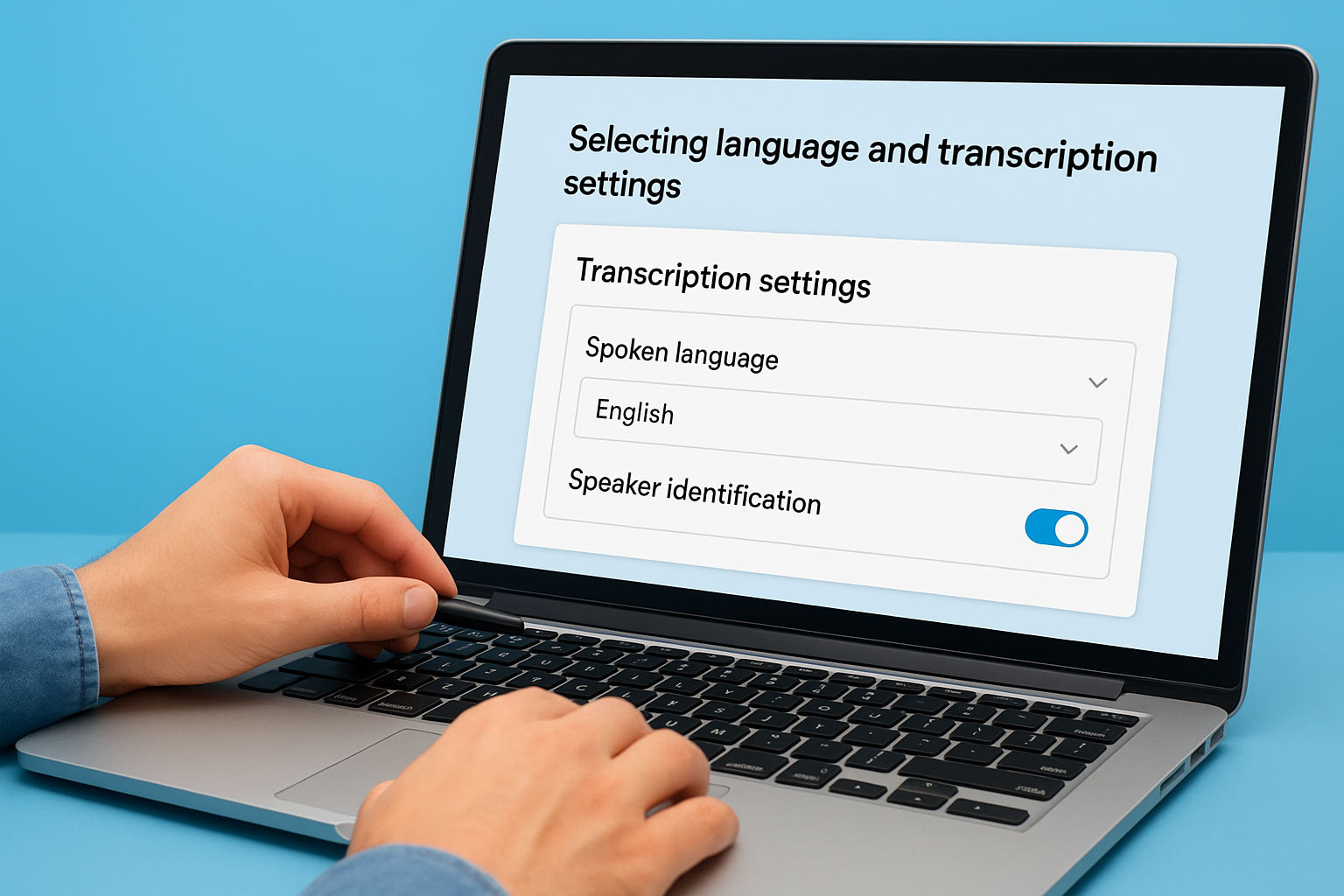
Enabling speaker identification adds accuracy to your transcript by separating distinct voices, but works optimally with clear audio where speakers don’t overlap frequently.
Sonix processes your file and sends an email notification when transcription completes, typically within 10 to 20 percent of your recording’s length. A 30-minute interview finishes in roughly 3 to 6 minutes. You click the notification link or return to your dashboard to open the completed transcript.
Editing and refining your transcript
Your transcript opens in Sonix’s browser-based editor with audio synchronized to text. Click any word and the audio jumps to that exact moment, letting you verify accuracy while listening. The editor displays a confidence score for each word, highlighting uncertain transcriptions in lighter colors so you know where to focus your review.
You correct mistakes by typing directly into the transcript like a word processor. Sonix updates timestamps automatically when you add or delete text. Use the Find and Replace tool to fix recurring errors, like a misspelled name or technical term that appears throughout. Add words to your custom dictionary so sonix transcription handles specialized vocabulary correctly in future uploads.
Sonix transcription pricing explained
Sonix uses a three-tier pricing model that separates occasional users from regular teams and high-volume organizations. You pay either per hour of audio transcribed or commit to a monthly subscription with discounted rates. Your choice depends on how frequently you transcribe and whether you need team collaboration features. The pricing structure remains transparent on their website, though additional services like translation add extra charges.
Standard plan for occasional use
You pay $10 per hour of transcription under the Standard pay-as-you-go plan without any monthly commitment. This option works best when you transcribe sporadically or handle project-based work rather than ongoing needs. Upload your file, pay for the exact duration transcribed, and access basic features like speaker labeling, timestamps, and the browser-based editor.
The Standard plan includes transcription in 38+ languages, word-by-word timestamps, custom dictionary options, and standard export formats. You don’t receive API access or advanced collaboration tools, which limits the plan to individual users or small one-off projects.
Premium subscription for teams
Your transcription costs drop to $5 per hour plus $22 per user monthly when you upgrade to Premium. Organizations processing regular volumes see immediate savings since the per-hour rate cuts in half compared to Standard pricing. Teams of three or more users typically break even within the first month when transcribing 10+ hours collectively.

Premium subscriptions unlock API access, centralized billing, 100GB of storage, and multiple custom dictionaries that Standard users cannot access.
Premium accounts gain advanced subtitle customization with font, size, color, and position controls. Your team members collaborate on the same transcripts, leave comments, and track changes across projects. The $22 monthly fee per user remains fixed whether you transcribe 5 hours or 50 hours, making costs predictable for budgeting purposes.
Enterprise volume pricing
High-volume users contact Sonix directly for custom Enterprise pricing that typically reduces per-hour costs below the $5 Premium rate. Organizations transcribing 100+ hours monthly or requiring advanced security controls qualify for this tier. Enterprise plans include 1TB of storage, entity detection, topic identification, and admin controls that smaller plans lack.
Hidden costs to watch for
Sonix transcription charges separate fees for translation services at the same hourly rate as your transcription plan. A file transcribed for $10 costs another $10 to translate into a second language. Automated alignment and burn-in subtitling also trigger additional hourly charges, so factor these costs when budgeting multimedia projects.
You purchase transcription credits upfront on pay-as-you-go plans, and unused credits remain active for 12 months before expiring. Subscription plans bill monthly regardless of usage, meaning light months where you transcribe minimal content still incur the full $22 per-user fee.
Sonix transcription accuracy in practice
Sonix transcription delivers 95 to 97 percent accuracy on clean audio with clear speakers and minimal background noise. You get results that require light editing rather than complete rewrites, which makes the platform viable for professional work. Your accuracy drops when recordings include technical jargon, heavy accents, multiple overlapping speakers, or poor audio quality. Understanding these variables helps you set realistic expectations before uploading files.
Real accuracy rates across audio types
Your best results come from studio-quality recordings with single speakers in controlled environments, where accuracy reaches the high 90s. Podcast interviews, webinars, and prepared presentations typically perform well since speakers articulate clearly. Business meetings with crosstalk and interruptions see accuracy dip to 85 to 90 percent because the AI struggles to separate simultaneous voices.
Phone recordings and conference calls present the biggest challenges since audio quality varies wildly. You encounter more errors when recordings include speaker phone echo, cellular compression, or background office noise. Legal depositions and medical consultations often mix specialized terminology with standard speech, which confuses the transcription engine unless you add terms to your custom dictionary beforehand.
Sonix processes audio at 10 to 20 percent of recording length, but accuracy depends more on audio clarity than processing speed.
Confidence scoring guides your editing
Sonix transcription assigns confidence levels to every word in your transcript, marking uncertain transcriptions in lighter gray text. You focus your editing time on these flagged sections rather than reviewing the entire document word by word. The platform categorizes confidence as very confident, fairly confident, or slightly confident, with percentages showing how much of your transcript falls into each category.
Your transcript quality report appears immediately after processing completes. A file marked 95 percent very confident needs minimal corrections, while one showing 70 percent confidence requires thorough review. This scoring system lets you decide whether the automated output meets your standards or if you should request human transcription for critical content.
Common errors you’ll encounter
Sonix transcription misses proper names, industry terms, and acronyms that don’t exist in its standard dictionary. You see "Alex" transcribed as "Alec" or technical product names rendered phonetically. The system doesn’t automatically remove filler words like um, uh, and mm, so your transcript includes these unless you delete them manually during editing.
Numbers and dates pose consistency problems. You might see "three hundred" in one paragraph and "300" in another, or dates written as "January 5th" versus "1/5". Homophones like "there/their/they’re" sometimes appear incorrectly depending on context. Regional accents cause substitutions where similar-sounding words replace the intended terms.
Using Sonix transcription with Zoom
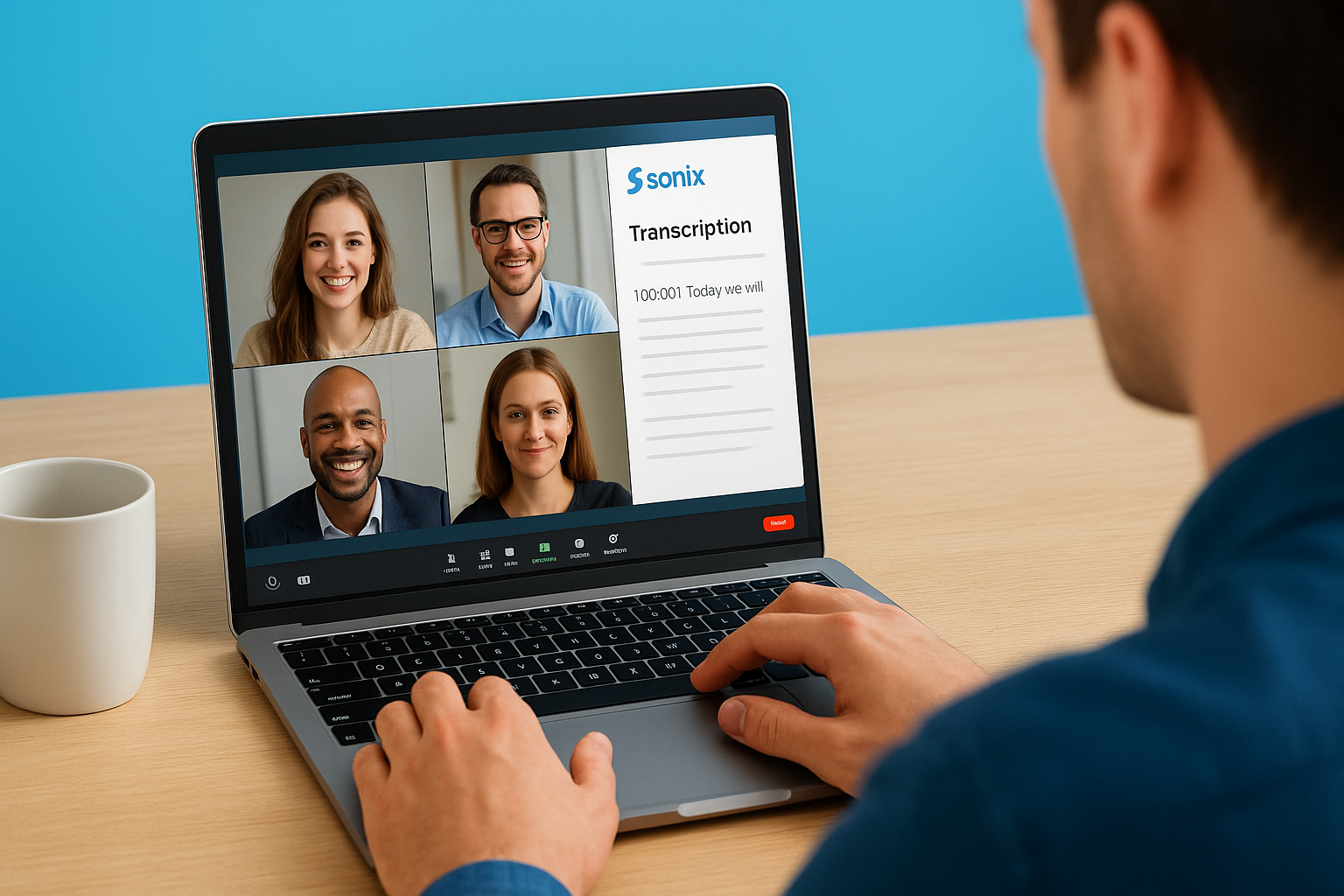
You connect Sonix transcription directly to your Zoom account to capture meeting recordings automatically without manual uploads. The integration eliminates the step where you download video files from Zoom and then upload them to Sonix separately. Your recorded Zoom sessions flow into Sonix as soon as they finish, triggering automatic transcription while you move on to your next task. This setup works best for teams conducting frequent virtual meetings that require searchable documentation for compliance, training, or reference purposes.
Connecting Sonix to your Zoom account
Your Zoom integration setup takes less than five minutes through the Sonix dashboard settings. Navigate to the integrations section and click "Connect Zoom Account," which redirects you to Zoom’s authorization page. You grant Sonix permission to access your cloud recordings, and the platform immediately begins monitoring your Zoom account for new recorded meetings.
Sonix only accesses recordings you’ve enabled in Zoom’s cloud storage, not local recordings saved to your computer. You configure Zoom to automatically record meetings to the cloud through your Zoom settings panel under Recording preferences. Select "Record to the cloud" as your default option, and specify whether you want all meetings recorded or only specific ones.
Organizations processing multiple daily Zoom calls reduce administrative overhead by 80 percent when automatic transcription eliminates manual file handling.
Automatic recording capture and processing
Sonix detects newly completed Zoom recordings within minutes after your meeting ends. The platform pulls the video file directly from Zoom’s cloud storage and queues it for transcription without requiring any action from you. Your meeting appears in the Sonix dashboard with a processing status indicator showing transcription progress in real time.
The integration preserves your original Zoom recording while creating the transcript, so you maintain both audio and text versions for different use cases. Large organizations appreciate this redundancy for compliance documentation where both formats serve as evidence. Your transcripts retain the meeting title, date, and participant information from Zoom metadata.
Accessing and managing Zoom transcripts
Your completed transcripts appear in the Sonix dashboard organized by date and meeting title, making recent sessions easy to locate. Click any transcript to open Sonix’s editing interface, where you correct speaker names, fix terminology errors, and add highlights to important sections. The platform maintains separate folders for Zoom content if you also upload files from other sources, keeping your workflow organized.
You export finished transcripts in multiple formats including PDF, DOCX, SRT for subtitles, or plain text. Share transcripts with team members who missed the meeting by sending them the Sonix link directly, or download files to attach in emails and project documentation. The integration supports batch processing, so transcribing ten consecutive meetings requires the same effort as transcribing one.
Sonix transcription features overview
Sonix transcription provides a complete toolkit for managing audio content beyond basic speech-to-text conversion. You gain access to search capabilities, translation tools, collaboration features, and export options that transform raw transcripts into usable documentation. The platform combines these features in a browser interface that requires no software installation, letting you work from any device with internet access. Understanding what each feature does helps you maximize the platform’s value for your specific workflow.
Search and navigation tools
Your transcripts become fully searchable the moment Sonix finishes processing. You type keywords into the search bar and the platform highlights every instance throughout the document, complete with timestamps that link directly to the spoken audio. This feature eliminates the need to replay entire recordings when you need to locate specific quotes, topics, or decisions mentioned during meetings.
The word-by-word timestamp system lets you click any sentence and jump immediately to that moment in the audio. You navigate through hour-long files in seconds rather than scrubbing through playback controls. Your editing workflow accelerates when you combine search with timestamps, since you verify accuracy by listening to flagged sections without losing your place.
Translation and multilingual support
Sonix translates completed transcripts into 40+ languages with a single click after transcription finishes. You receive a new document in your target language while keeping the original transcript intact. This feature proves valuable when you need to share content with international teams or document multilingual meetings where participants speak different languages.
Translation costs match your transcription rate, so budget accordingly when planning multilingual projects that require content in multiple languages.
Your translated transcripts maintain the same timestamps and speaker labels as the source document. This synchronization means you can reference the exact audio moment even when reading in a different language. Organizations handling customer support calls or global conferences use this feature to create documentation that serves multiple markets simultaneously.
Export and collaboration options
You download transcripts in PDF, Word, SRT subtitle files, plain text, or HTML formats depending on your end use. The subtitle export includes precise timestamps formatted for video editing platforms, while Word files preserve formatting for reports and documentation. Your team members access shared transcripts through password-protected links that you generate from the Sonix dashboard.
Premium and Enterprise users add comments, assign tasks, and track changes directly within transcripts. These collaboration tools turn static documents into active project hubs where teams discuss content, flag items for follow-up, and maintain version history across editing sessions.
When to choose human transcription instead
Sonix transcription handles most routine audio efficiently, but certain situations demand human transcriptionists who catch nuances that automated systems miss. You face legal liability, compliance failures, or miscommunication when accuracy matters more than speed and cost. Recognizing these scenarios before you commit to automated transcription saves you from costly corrections or potential disputes later.
Legal and medical documentation requirements
Your legal depositions, court proceedings, and medical records require 99 to 100 percent accuracy that automated systems cannot guarantee. Courts reject transcripts containing errors that alter testimony meaning, and medical mistakes lead to treatment errors or malpractice exposure. Human transcriptionists understand legal terminology, follow strict formatting rules, and provide certified accuracy statements that satisfy regulatory requirements.
Medical transcription demands knowledge of anatomy, pharmacology, and diagnostic procedures that general AI models lack. Your physicians dictate complex case notes mixing symptoms, medications, and treatment plans where a single word error changes patient care. Professional medical transcriptionists verify unfamiliar terms, flag inconsistencies, and maintain HIPAA compliance through secure workflows.
Complex audio requiring human judgment
You need human transcriptionists when recordings include heavy accents, extreme background noise, or multiple overlapping speakers that confuse automated systems. Conference panels where participants interrupt each other, field recordings in noisy environments, or interviews with non-native speakers produce transcripts requiring extensive human correction that eliminates automation savings.
Human transcriptionists cost $1.50 to $3.00 per minute but deliver superior accuracy on challenging audio where automated tools produce unusable results.
Research projects analyzing conversation patterns, emotional tone, or subtle meaning depend on contextual understanding that AI misses. Your qualitative research transcripts need notation for pauses, laughter, and emphasis that automated systems either ignore or mark inconsistently. Academic standards for interview transcription typically require human verification even when you start with automated drafts.
Next steps
You now understand Sonix transcription pricing structures, accuracy expectations, and integration capabilities across different use cases. Your immediate action involves testing the platform with your actual audio files during the free 30-minute trial period to verify whether it meets your quality standards. Upload samples that represent your typical recording conditions, including challenging audio if that reflects your regular workflow.
Consider your volume and frequency to determine which plan delivers the best value. Organizations transcribing 10+ hours monthly typically benefit from Premium subscriptions, while occasional users save money with pay-as-you-go Standard pricing. Track your monthly usage for three months to establish baseline costs before committing to annual plans.
Situations requiring guaranteed accuracy, legal certification, or specialized domain expertise call for professional human transcription services. Contact Languages Unlimited when your projects demand certified accuracy for court proceedings, medical documentation, or compliance purposes that automated tools cannot satisfy.