



Whether you’re transcribing depositions, medical consultations, conference recordings, or training videos, finding a reliable video to text transcription service can save hours of manual work. But accuracy matters, especially when the transcript will be used for legal proceedings, compliance documentation, or patient records.
Not every tool or service handles these demands equally. Some AI-powered platforms are fast and affordable but struggle with speaker identification, accents, or specialized terminology. Others deliver polished, human-reviewed transcripts but charge a premium. Knowing where each option excels helps you pick the right fit for your specific use case.
At Languages Unlimited, transcription is one of our core services, we’ve been converting spoken content into accurate written text since 1994, backed by a network of over ten thousand language professionals. We built this guide to give you an honest look at five strong video-to-text transcription options available right now, including what each one does best and where it falls short.
1. Languages Unlimited
Languages Unlimited offers human-reviewed transcription as part of a broader language services platform that has operated since 1994. When you submit a video file, a trained transcriptionist converts the spoken content into text, with the option for a second reviewer to catch errors before the final document reaches you.
What you get
You get a complete video to text transcription service that handles everything from depositions and medical consultations to corporate training recordings. Languages Unlimited supports over 200 languages, so multilingual video content is not a barrier.
Best for
This service fits organizations that cannot afford transcription errors, such as law firms, hospitals, government agencies, and compliance teams. If your recordings include specialized terminology (medical, legal, or technical), human transcriptionists familiar with that vocabulary produce far fewer mistakes than AI alone.
When accuracy directly affects a legal or medical outcome, human oversight is not optional.
Turnaround and accuracy
Turnaround depends on project length and complexity, but Languages Unlimited can handle large or urgent projects through its network of over ten thousand language professionals. Accuracy is high because trained human reviewers handle the final output rather than relying solely on automated speech recognition.
Pricing and limits
Languages Unlimited uses custom project-based pricing rather than a flat per-minute rate. You contact the team directly to get a quote based on your video length, language, and turnaround requirements. This approach means no rigid subscription tiers that force you into a plan that does not match your volume.
Key trade-offs
The main trade-off is cost and speed compared to fully automated tools. If you need a rough transcript in minutes for internal use, an AI-only tool may serve you better. But if your transcript will be used in court, submitted to a regulator, or included in a medical record, the accuracy Languages Unlimited provides justifies the investment.
2. HappyScribe
HappyScribe is an AI-powered transcription platform that converts video files into text automatically. It supports over 120 languages and offers both automated and human-made transcription options depending on your accuracy requirements.
What you get
You get an online editor where you can upload video files and receive a transcript within minutes. The platform includes several useful features out of the box:
- Speaker identification and timestamps
- Export options in SRT, TXT, and DOCX formats
- A built-in editor for quick corrections
Best for
This tool works best for content creators, journalists, and researchers who need fast turnaround on general-purpose recordings. If your video content involves clear audio and standard vocabulary, the automated tier handles most of the work without human involvement.
Turnaround and accuracy
Automated transcription on HappyScribe typically finishes within a few minutes depending on file length. Accuracy sits around 85% for clean audio but drops noticeably with accents, background noise, or technical terminology.
For legal or medical recordings, the automated tier alone is unlikely to meet your accuracy standards.
Pricing and limits
HappyScribe charges per minute of audio on a pay-as-you-go basis or through subscription plans. Human-made transcription costs significantly more than the automated option.
Key trade-offs
The platform handles everyday transcription tasks well, but it is not built for compliance-sensitive work. You will need to review and correct the output if your video to text transcription service requirements demand a high accuracy bar.
3. Sonix
Sonix is an automated transcription platform built around speed and an in-browser editing experience. It converts your video files into text quickly and gives you tools to clean up the transcript without leaving the platform.
What you get
The platform provides automated speech-to-text conversion with a built-in editor, speaker labeling, and multi-language support across roughly 40 languages. You can export your finished transcript in multiple formats including SRT, DOCX, and TXT.
Best for
This tool suits media teams, podcasters, and researchers who produce high volumes of content and need transcripts turned around fast. It works well when your recordings have clean audio and standard vocabulary.
Turnaround and accuracy
Sonix completes automated transcription in a few minutes per hour of video. Accuracy lands around 85-90% for clear recordings, but drops with heavy accents or domain-specific terminology like legal or medical language.
If your transcripts feed into compliance workflows or legal records, automated output alone will need significant editing before use.
Pricing and limits
Pricing runs $10 per hour on a pay-as-you-go basis, with subscription plans starting at $22 per month for regular users. There is no built-in human review option.
Key trade-offs
Sonix does not offer human-reviewed transcription, so every error in the automated output lands on you to fix. If your video to text transcription service needs involve sensitive or specialized content, you will want a service that includes human oversight.
4. Riverside Transcription
Riverside started as a remote recording platform for podcasts and video interviews, and transcription is built directly into that workflow. When you record a session on Riverside, the platform automatically generates a text transcript from your video, keeping everything in one place.
What you get
You get automated AI transcription tied directly to your recording session. The platform produces timestamped transcripts with speaker labels and lets you edit video by editing the text itself, which is useful if you produce a lot of interview-style content.
Best for
Riverside suits podcasters, video creators, and content teams who already record inside the platform. If you need a standalone video to text transcription service for pre-existing files or professional-grade work, other options on this list serve that need better.
Turnaround and accuracy
Transcripts generate automatically after your recording ends, typically within a few minutes. Accuracy holds up well for clean studio audio but drops with crosstalk, accents, or specialized vocabulary.
Riverside’s transcription works best when the recording itself happened inside Riverside.
Pricing and limits
The free plan includes basic transcription, while paid plans start at $15 per month. Transcription for video files recorded outside the Riverside ecosystem has limited support.
Key trade-offs
Riverside locks most of its transcription value inside its own recording environment. If your videos were recorded elsewhere, you will find the workflow restrictive compared to dedicated transcription platforms.
5. GoTranscript
GoTranscript is a human-powered transcription service that relies on trained human transcriptionists rather than automated speech recognition. If you need a video to text transcription service that prioritizes accuracy over speed, GoTranscript positions itself as a more affordable human-first option.
What you get
You get fully human-transcribed text from your video files, with support for over 60 languages. The platform includes timestamps, speaker identification, and multiple export formats such as DOCX, TXT, and SRT.
Best for
GoTranscript suits individuals and teams who need human accuracy without enterprise pricing. It works well for academic researchers, journalists, and small businesses that regularly handle recorded interviews or meetings with varied accents or background noise.
Turnaround and accuracy
Turnaround runs around 6 to 24 hours depending on file length and current demand. Accuracy sits at 99% according to GoTranscript’s own published claims, though real-world results vary based on audio quality.
Human transcription handles difficult audio better than any automated tool on this list.
Pricing and limits
GoTranscript charges around $0.84 per minute for standard human transcription, making it one of the more affordable human options. Rush delivery is available at a higher rate.
Key trade-offs
The main limitation is turnaround time. If your project requires a transcript within minutes, GoTranscript does not meet that need. The service also lacks the compliance certifications and specialized professional expertise that regulated industries like healthcare and law typically require.
Final take
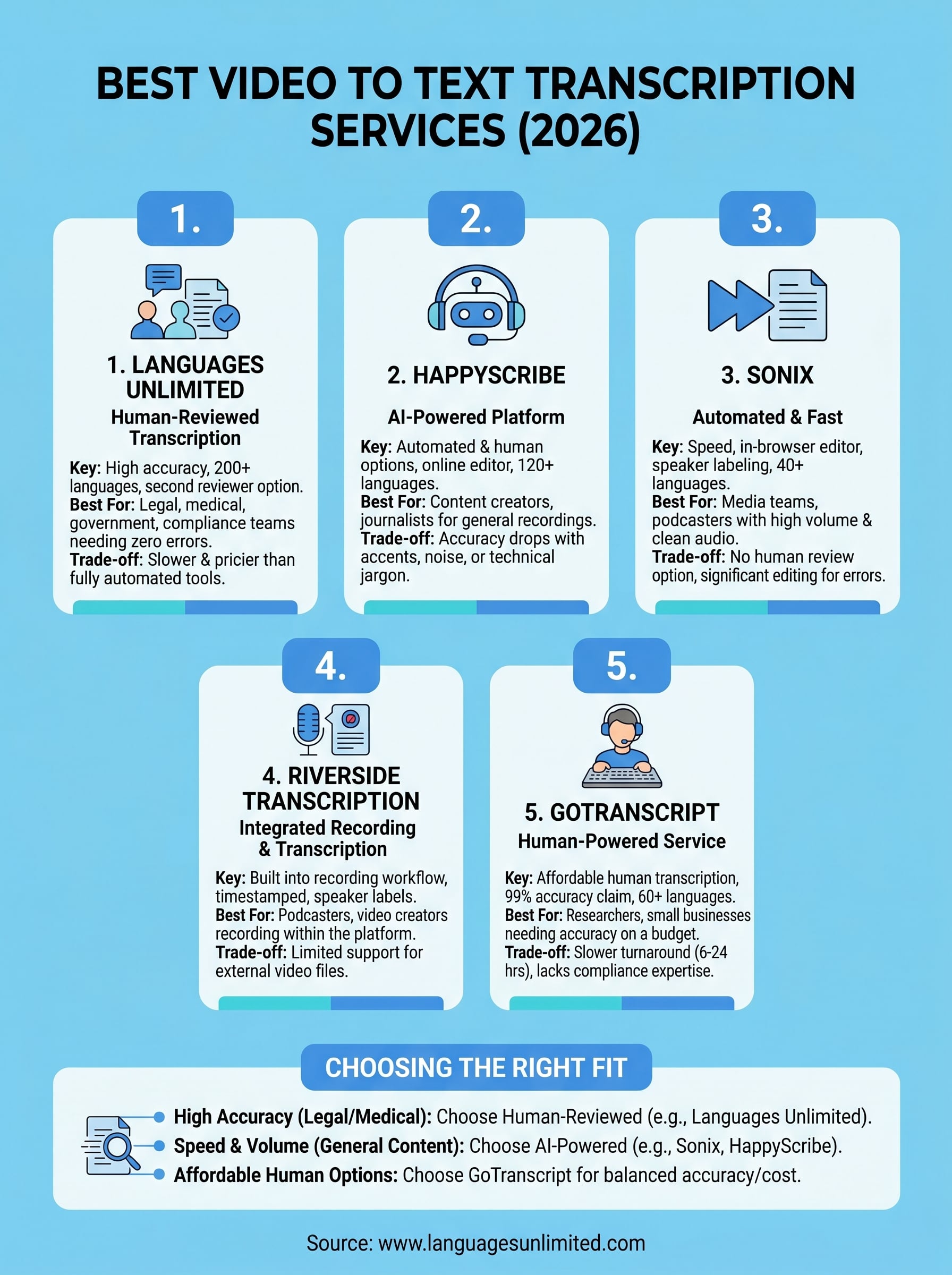
Each option on this list fills a different slot. AI-powered tools like HappyScribe, Sonix, and Riverside work well for high-volume, general-purpose content where a few errors are acceptable. GoTranscript gives you human accuracy at a lower price point, but without the compliance expertise or language depth that regulated industries need.
If you work in law, healthcare, government, or any field where your video to text transcription service output carries real consequences, human-reviewed transcription backed by certified professionals is the safer choice. Languages Unlimited has delivered that level of accuracy and expertise since 1994, across over 200 languages, for clients who cannot afford mistakes in their final documents.
Before you commit to a platform, think about what happens if the transcript contains an error. If the answer makes you uncomfortable, you already know which direction to go. Contact Languages Unlimited to discuss your project and get a quote.