



When a company decides to release its software in a new market, translating the interface word-for-word rarely gets the job done. The software localization definition goes well beyond swapping one language for another, it’s the process of adapting every element of a software product so it looks, feels, and functions as though it were built natively for a specific region. That means adjusting date formats, currencies, cultural references, layouts, and even color choices to match local user expectations.
At Languages Unlimited, we’ve supported businesses, government agencies, and organizations with professional language services since 1994. Our network of over ten thousand translators and interpreters across 200+ languages gives us a front-row perspective on what it actually takes to make software work for global audiences. Localization sits at the intersection of language expertise and technical precision, and getting it wrong can mean lost users, compliance issues, or a product that simply doesn’t land.
This article breaks down exactly what software localization is, how it differs from standard translation, why it matters for companies expanding internationally, and the key steps involved in doing it right. Whether you’re a project manager planning a multilingual rollout or a developer preparing your codebase for new markets, you’ll walk away with a clear, practical understanding of the process from start to finish.
What software localization includes
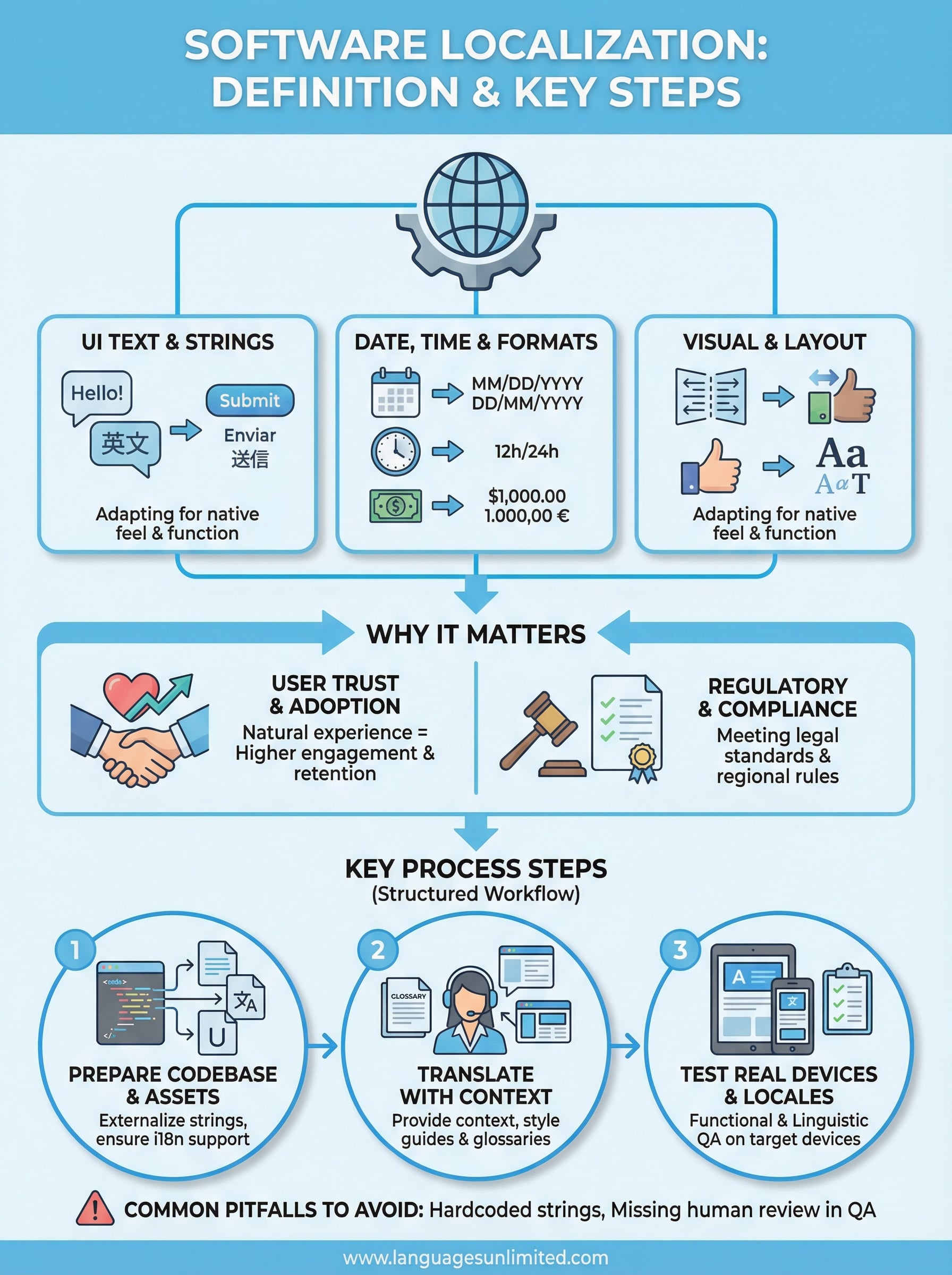
The full software localization definition covers a wide range of components that go far beyond the text users read on screen. When you localize software properly, you’re adapting the entire user experience to fit a specific locale, including how data is displayed, how the interface is laid out, and how the product handles region-specific rules and conventions. Think of it as rebuilding the product’s personality for each market you enter.
UI text and string adaptation
The most visible part of localization is adapting the user interface text, which includes menus, buttons, error messages, tooltips, and onboarding flows. Your development team typically stores this content in resource files or string libraries, which makes it easier to swap languages without touching the underlying code. However, direct translation of strings is rarely enough. Words that work perfectly in English may be far longer in German or shorter in Chinese, and that affects how text wraps, how buttons size, and how much space you need in your UI components.
Getting your string adaptation right from the start saves you significant rework later, especially when supporting languages with vastly different character lengths or reading directions.
Beyond length, you also need to account for tone and context. A button labeled "Submit" in English might need different phrasing depending on whether the action involves a form, a payment, or a request, and that nuance carries over into every language you support. Provide translators with context notes and screenshots so they can match the right register for each string.
Date, time, and number formats
Regional formatting conventions vary dramatically, and failing to adapt them creates immediate friction for users. In the United States, dates follow a month-day-year format, while most of Europe uses day-month-year, and parts of East Asia use year-month-day. Time formats shift between 12-hour and 24-hour systems depending on the locale. Currency symbols, decimal separators, and thousands separators also differ by region, with some countries using a period where others use a comma.
Your software needs to handle these format conversions dynamically based on the user’s locale settings rather than hardcoding regional preferences into the codebase. Libraries and internationalization frameworks can automate much of this, but you still need to test each locale to confirm the output looks correct in context.
Visual and layout adjustments
Localization also touches your visual design. Languages like Arabic and Hebrew read right to left, so your entire layout may need to mirror horizontally for those markets. Images, icons, and colors carry cultural meaning too. A thumbs-up icon reads positively in the US but may land differently in other regions.
Your typography choices matter as well, since fonts that support Latin characters may not render Asian or Arabic scripts correctly. Always test your visual components with actual localized content, not placeholder text, to catch layout breaks before they reach users.
Localization vs translation and internationalization
People often use "translation," "localization," and "internationalization" interchangeably, but they describe three distinct activities that serve different roles in a global product strategy. Understanding where each one starts and stops helps you allocate resources correctly and avoid gaps that create a poor experience for users in new markets.

Translation as one piece of the puzzle
Translation is the process of converting written content from one language to another while preserving meaning. It’s an essential part of localization, but it covers only the linguistic layer of your software. A translator working on your product will handle menus, error messages, and help documentation, but they won’t reformat your date fields, adjust your layout for right-to-left scripts, or flag that a particular icon carries unintended meaning in a target culture.
When you rely on translation alone, you end up with a product that speaks the right words but still feels foreign to local users. Localization wraps around translation to handle every other adaptation your software needs to feel native.
The software localization definition exists precisely because translation, on its own, was never enough to make a product succeed in a new market.
Internationalization as the foundation
Internationalization, often abbreviated as i18n, is the engineering work you do before localization begins. It means designing and building your software so that regional adaptations can be applied later without major code changes. This includes externalizing strings into resource files, building in support for Unicode character sets, and structuring your UI so it can flex to accommodate different text lengths and reading directions.
Think of internationalization as laying the infrastructure. Localization is the work you do on top of that infrastructure for each specific market. Skipping or rushing internationalization forces your team to rework the codebase every time you add a new locale, which costs significantly more time and money than getting it right from the start.
Why software localization matters
Understanding the full software localization definition makes it easier to see why skipping this process costs companies real users and real revenue. Research from Common Sense Advisory has consistently shown that the majority of consumers prefer to buy products in their native language, even when they speak English well enough to use an English-language version. If your software doesn’t speak to users in a way that feels natural and familiar, they’ll find a competitor that does.
User trust and adoption
When your software handles local date formats, currency symbols, and culturally appropriate language, users trust it immediately. That trust translates directly into adoption rates, retention, and word-of-mouth. A product that displays the wrong currency format or uses idioms that don’t carry over into the target language feels unfinished, and users in that market will treat it accordingly.
Localized software consistently outperforms non-localized versions in new markets because users engage more deeply with products that feel built for them.
Your onboarding experience is particularly sensitive to localization gaps. If a new user encounters confusing UI text, misformatted data, or culturally off-putting visuals during their first session, you lose them quickly, often permanently. Getting localization right at the start of a user’s journey sets a strong foundation for long-term engagement.
Regulatory and legal compliance
Beyond user experience, legal and regulatory requirements in many markets make localization mandatory rather than optional. Healthcare software, financial applications, and government-facing tools often must meet region-specific compliance standards that include displaying information in the local official language and formatting data according to national standards.
Failing to meet these requirements exposes your company to fines, contract rejections, and blocked market entry. Localization in these contexts isn’t a competitive advantage, it’s a baseline obligation you need to meet before you can operate legally.
Key steps in a software localization process
Understanding the software localization definition helps, but knowing the steps that move a product from one locale to another is what actually gets work done. Each phase builds on the one before it, so skipping steps early creates compounding problems later. A structured process gives your team clear handoff points and reduces the risk of costly rework.

Prepare your codebase and assets
Before any translation work begins, your development team needs to externalize all user-facing strings into resource files and verify that your codebase supports Unicode. This preparation stage determines how smoothly every subsequent step runs. You should also audit your UI components for hardcoded text, fixed-width containers, and culturally specific imagery before handing anything off to translators.
Skipping this preparation phase is the single most common reason localization projects run over budget and schedule.
Build a translation glossary and a style guide for each target language at this stage. These reference documents give translators consistent terminology and tone guidelines from day one, which reduces revision cycles significantly.
Translate and adapt content with context
Send your resource files to qualified translators along with screenshots, glossaries, and context notes for every string. Translators working without context produce literal translations that miss the intent behind a UI element. Your project manager should match translators to your software category, whether that’s healthcare, legal, or enterprise tools, so domain-specific terminology stays accurate throughout.
Test across real devices and locales
Once localized builds are ready, run functional and linguistic testing across real devices set to each target locale. You need to confirm that date and number formats display correctly, that text doesn’t overflow or truncate in UI containers, and that right-to-left layouts mirror properly where required. Assign in-market reviewers to catch anything that passed automated checks but still reads awkwardly in context.
Common pitfalls and QA for localized software
Even when you understand the full software localization definition, execution errors can undermine a release that looked clean during development. The most frequent problems surface not during translation but during integration and testing, when localized strings meet real UI components and real device environments for the first time.
Pitfalls to watch before launch
Hardcoded strings buried in your codebase are the most common culprit behind incomplete localization. Developers sometimes embed user-facing text directly in code rather than in resource files, which means those strings never reach translators and display in the original language regardless of what locale a user sets. Pseudo-localization testing, which replaces characters with accented or extended equivalents before real translation begins, catches these missed strings early and saves significant time in later stages.
Relying heavily on machine translation without human review creates a separate set of problems. Automated tools handle volume well but miss context, tone, and domain-specific terminology, which produces output that reads awkwardly or misleads users at critical moments like error messages or legal disclosures.
Running machine translation output through a qualified human reviewer before release is not optional if your software operates in healthcare, legal, or financial environments.
Building a reliable QA process
Your QA workflow for localized software should include three layers: automated string validation, functional testing on real devices set to each target locale, and in-market linguistic review by a native speaker with relevant domain knowledge. Automated checks catch missing strings, truncated text, and broken formatting rules efficiently, but they cannot tell you whether a phrase sounds natural or carries the right meaning in context.
Assign in-market reviewers who understand both the language and the software category. A reviewer fluent in Spanish but without healthcare background will miss terminology errors that a Spanish-speaking medical professional would catch immediately.
Final thoughts
The software localization definition makes one thing clear: adapting software for a new market requires more than converting text from one language to another. It demands coordinated work across engineering, translation, design, and QA to produce a product that users in each target locale can trust and engage with naturally. Every step you take, from internationalizing your codebase to running in-market linguistic reviews, builds toward that outcome.
If you’re preparing a software product for new markets and need qualified translators or interpreters with domain expertise, the foundation you build with the right language professionals matters enormously. Languages Unlimited has worked with businesses, healthcare providers, government agencies, and legal teams across the United States since 1994, with a network of over ten thousand language professionals covering 200+ languages. Reach out to our team to discuss what your project requires and get support tailored to your specific industry and target locales: contact our language services team.