



If your videos lack proper captions or subtitles, you could be excluding millions of people with hearing disabilities, and exposing your organization to legal risk. ADA compliant subtitles aren’t optional for many businesses, government agencies, and healthcare providers. They’re a legal obligation under the Americans with Disabilities Act, and the standards behind them are more specific than most people realize.
Getting subtitles wrong, whether through auto-generated captions full of errors or missing formatting standards, can result in complaints, lawsuits, and inaccessible content that fails the people who need it most. Courts have consistently held that digital video content falls under ADA requirements, and enforcement actions are increasing year over year.
This article breaks down what ADA compliance actually requires for subtitles and captions, the technical standards your content must meet, and the best practices that keep you compliant without cutting corners. At Languages Unlimited, we provide professional captioning and subtitling services across 200+ languages, built on three decades of experience helping organizations in legal, medical, government, and educational settings meet accessibility and compliance requirements. What follows is a practical guide drawn from that expertise.
Why ADA compliant subtitles matter
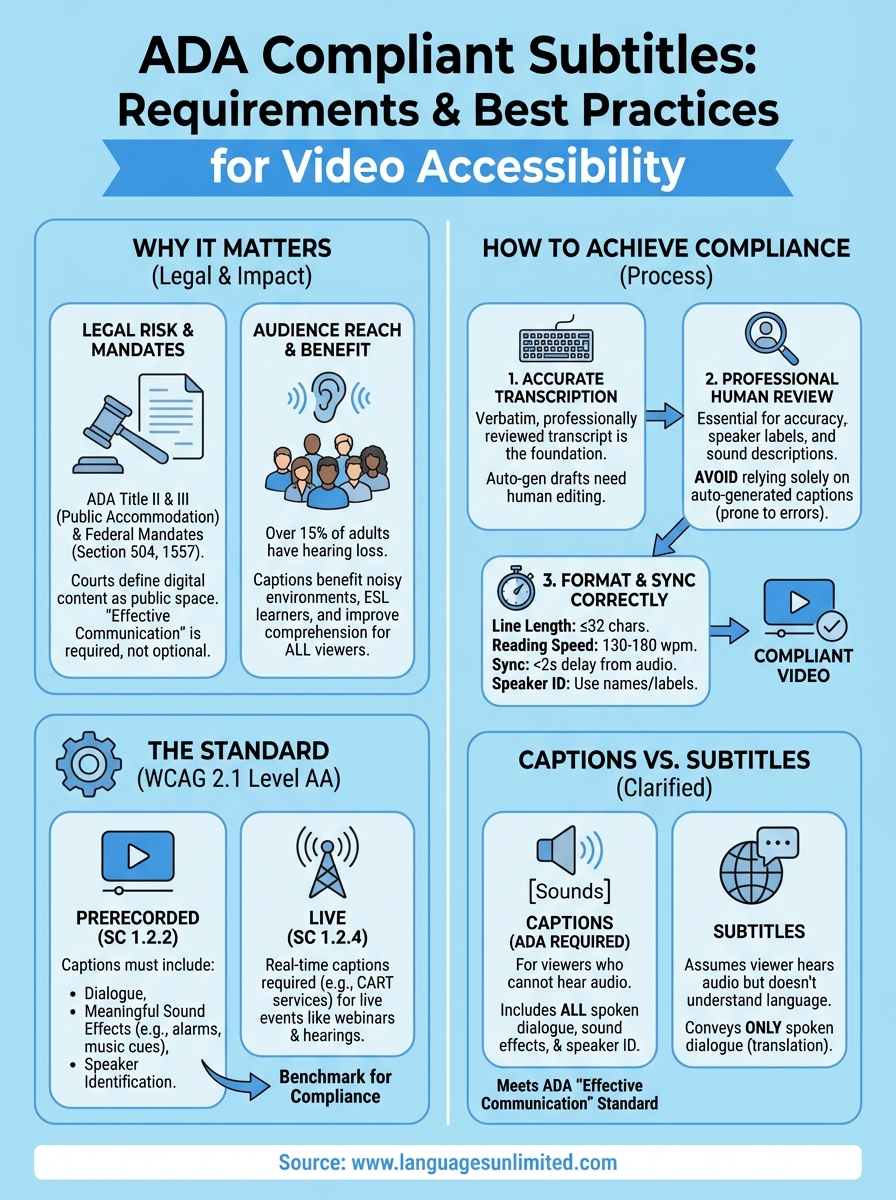
When your video content lacks proper captions, you’re not just missing a feature. You’re potentially breaking federal law and excluding a significant portion of your audience. Over 15% of American adults report some degree of hearing loss, and many depend on captions to access video in full. ADA compliant subtitles close that gap directly, making your content usable for the people who need it most, and keeping your organization on the right side of the law.
The legal risk is real and growing
Courts have ruled repeatedly that websites and digital platforms qualify as places of public accommodation under Title III of the ADA. That means businesses with inaccessible video content face genuine legal exposure. Class action lawsuits targeting inaccessible digital content have increased sharply over the past decade, with video captioning violations among the most cited complaints filed by disability rights organizations.
Ignoring caption compliance is not a minor oversight. It is the kind of gap that draws formal demand letters, agency complaints, and litigation.
If your organization operates in healthcare, government, or education, the exposure is even greater because you are also subject to additional federal mandates like Section 504 of the Rehabilitation Act and Section 1557 of the Affordable Care Act. A single compliance failure in a patient education video or a public agency recording can trigger investigations that go well beyond a standard ADA complaint.
Who benefits beyond legal compliance
The case for captions extends well past avoiding lawsuits. Viewers watching video in noisy environments, such as a crowded waiting room or a public transit commute, rely on captions even when they have no hearing impairment. Research consistently shows that captions improve comprehension and information retention for all viewers, not just those with disabilities.
Your audience members who speak English as a second language also benefit directly. Accurate captions help people who are still building language fluency or who process written text more reliably than spoken audio. When you invest in professional captioning, you broaden your reach, improve the viewing experience, and meet your legal obligations all at once.
What the ADA requires for online video
The ADA does not include a dedicated technical specification for video captions. What it does include, under Title II and Title III, are broad accessibility mandates that courts and federal agencies have consistently applied to digital video content. Title II applies to state and local government entities, requiring them to make all public communications accessible. Title III applies to businesses and places of public accommodation, a category that federal courts have extended to include websites and online video platforms.
How courts have interpreted "public accommodation"
The expansion of ADA coverage to online content has come largely through federal case law rather than statutory text. Courts in multiple circuits have ruled that a website or app used by a business constitutes a place of public accommodation, meaning any video content your organization hosts there must meet accessibility standards. If you publish training videos, product demonstrations, or public service announcements online, those fall squarely within ADA scope.
Failing to caption online video is no longer treated as an ambiguous compliance edge case. Courts treat it as a clear and actionable accessibility barrier.
What "effective communication" means for video
The ADA requires that organizations provide effective communication to people with disabilities. For video content, that standard means your captions must be accurate, synchronized, and complete enough to convey the same information a hearing viewer receives.
Auto-generated captions with frequent errors or missing speaker identification typically do not meet this standard, even if they technically exist. Delivering ada compliant subtitles means using captions that are professionally reviewed, properly timed, and formatted to capture the full meaning of your content.
WCAG criteria that affect captions and subtitles
The Web Content Accessibility Guidelines (WCAG), published by the W3C, define the technical standards that directly shape what ada compliant subtitles must look like in practice. WCAG 2.1 Level AA is the benchmark most federal agencies and courts reference when evaluating whether digital content meets accessibility requirements. Understanding the specific success criteria that apply to captions helps you build compliant video content from the start.
Success Criterion 1.2.2: Captions (Prerecorded)
This criterion requires captions for all prerecorded audio content in synchronized media, meaning any video that contains speech or meaningful sound. Your captions must cover all elements that carry meaning for the viewer, not just the spoken words. A caption file that omits critical sound cues or speaker identification does not satisfy this criterion, regardless of how clean the transcript looks.
At minimum, your captions under 1.2.2 should capture:
- All spoken dialogue, including overlapping speech
- Meaningful sound effects, such as alarms, music cues, or laughter
- Speaker identification when multiple voices are present
WCAG 1.2.2 at Level AA is the single most cited standard in ADA-related captioning disputes, making it the benchmark your organization cannot afford to miss.
Success Criterion 1.2.4: Captions (Live)
Live video carries a separate compliance requirement under WCAG 1.2.4, which mandates real-time captions for live synchronized media. If your organization broadcasts live webinars, town halls, or public hearings, those events require live captioning, not just a post-event transcript.
CART (Communication Access Real-Time Translation) services typically satisfy this requirement because they deliver verbatim captions with minimal delay, produced by trained human professionals rather than automated speech recognition alone.
How to create ADA compliant subtitles
Creating compliant captions starts with a clear process, not guesswork. Professional human review is the foundation of every caption file that actually meets legal and technical standards. If you rely on auto-generated captions without editing them, you are almost certainly producing errors that fail both the WCAG criteria above and the ADA’s effective communication requirement.
Start with accurate transcription
Your first step is getting a verbatim, reviewed transcript of your audio. Automated speech recognition tools can help you generate a rough draft faster, but a trained professional must review every line before you publish. Speaker labels, meaningful sound descriptions, and accurate punctuation all need to be present before you move to formatting.
A caption file with a 95% word accuracy rate still contains enough errors to mislead viewers and expose your organization to a compliance complaint.
Format and sync your captions correctly
Once your transcript is accurate, formatting and timing determine whether your captions are usable. Follow these core standards to keep your content compliant:

- Line length: Keep each caption line to 32 characters or fewer when possible
- Reading speed: Target 130 to 180 words per minute so viewers can keep pace
- Synchronization: Captions should appear within two seconds of the corresponding audio
- Speaker identification: Use name labels or brackets when two or more speakers appear on screen
Work with a professional captioning provider to apply these standards consistently across every video your organization publishes. ada compliant subtitles require both accuracy and correct technical formatting to hold up under scrutiny.
Captions, subtitles, and transcripts explained
These three terms get used interchangeably online, but they serve different purposes and carry different compliance implications. Understanding which format your content requires helps you avoid gaps in your accessibility coverage and ensures you’re meeting the right standard for each type of video you publish.
Captions vs. subtitles
Captions are designed for viewers who cannot hear the audio. They include all spoken dialogue, sound effects, and speaker identification, giving deaf and hard-of-hearing viewers a complete picture of what’s happening on screen. Subtitles, by contrast, assume the viewer can hear the audio but does not understand the language. Subtitles convey spoken words only, leaving out sound effects and non-speech audio cues.
For ADA compliance purposes, captions are the required format, not subtitles, because they convey the full audio experience rather than dialogue alone.
When organizations produce ada compliant subtitles for accessibility, they are technically producing captions in the ADA sense, even if the platform labels them as subtitles.
Transcripts and when they’re enough
Transcripts provide a written version of your audio or video content, but they are not synchronized to the video timeline. For prerecorded audio-only content, a transcript may satisfy WCAG requirements under Success Criterion 1.2.1. For synchronized video content, however, a standalone transcript does not replace captions.
Your viewers need text that appears in real time alongside the video to meet the effective communication standard the ADA requires. A transcript published separately on the same page does not satisfy that requirement for video files.
Make your videos accessible going forward
ADA compliance for video content isn’t a one-time project. Every new video you publish carries the same legal and ethical obligations as the content already on your site. Building a repeatable process, starting with accurate transcription and ending with professionally formatted captions, protects your organization and serves every viewer who depends on accessible content.
Professional captioning is the most reliable path to meeting the standards covered in this article. Auto-generated captions introduce errors that put you out of compliance, while professional review keeps your content accurate, synchronized, and legally defensible. When you need ada compliant subtitles across multiple languages or formats, working with an experienced provider removes the guesswork entirely.
Languages Unlimited has supported organizations in healthcare, government, and legal settings since 1994. Our team handles captioning and subtitling across 200+ languages, including services built for legal, medical, and government requirements. Contact us today to start meeting your video accessibility requirements with a provider who knows compliance from the ground up.