



Poor captions don’t just frustrate viewers, they create real barriers to access. Whether it’s garbled auto-generated text, captions that fly off-screen too fast, or missing speaker labels in a multi-person panel, bad captioning undermines the entire point of having captions at all. Following proven captioning best practices makes the difference between content that’s truly inclusive and content that only checks a compliance box on paper.
Getting captions right matters more than most teams realize. Roughly 1 in 5 Americans live with some form of hearing difficulty, and millions more rely on captions in noisy environments, while learning a second language, or when they simply can’t turn on audio. Add federal requirements like Section 508 and ADA compliance into the mix, and the stakes go beyond user experience, they become legal.
At Languages Unlimited, captioning is one of our core accessibility services. Since 1994, we’ve helped organizations across healthcare, government, legal, and education produce captions that meet both technical standards and real-world usability needs. That hands-on experience shapes every recommendation in this guide. Below, we break down eight specific practices, covering formatting, timing, accuracy, and speaker identification, so you can create captions that serve every viewer.
1. Work with a professional captioning partner
Handling captions in-house sounds manageable until you encounter fast dialogue, specialized terminology, or a compliance audit. Outsourcing to a professional captioning partner removes the guesswork, reduces error rates significantly, and lets your team focus on the content itself rather than the technical demands of accurate, compliant captioning.
When you should outsource captioning
You should outsource when your video content involves multiple speakers, regulatory requirements, or subject-specific vocabulary that automated tools routinely mishandle. Live events, legal depositions, medical training videos, and government communications all carry a higher margin for error, and a mistake in any of those contexts can have real consequences for your audience or create legal exposure for your organization. If you publish video content regularly or at scale, the cost of in-house errors almost always exceeds the cost of professional captioning.
What to look for in a captioning vendor
A reliable vendor should demonstrate accuracy rates above 99%, clear knowledge of the compliance standards that apply to your content type, and a documented revision process. Ask specifically about their quality assurance steps, turnaround times for different content lengths, and whether they deliver certified or platform-ready caption files. A vendor who cannot clearly answer those questions is a risk, not a resource.
Selecting a vendor without verified quality controls is one of the fastest ways to undermine your captioning best practices before your content ever reaches a viewer.
How Languages Unlimited handles compliant captioning
Languages Unlimited works with a network of over ten thousand language professionals and delivers captioning services built around federal accessibility standards, including Section 508. The team handles everything from file formatting to timing review, so you receive caption files that are ready to upload without additional corrections or back-and-forth.
How to brief a captioner for better results
Even the most skilled captioner produces better output with proper context upfront. Before submitting your audio or video, provide a glossary of technical terms, correct spellings of proper names, and any acronyms your content uses. Flag sections with overlapping dialogue or poor recording quality so the captioner can apply extra attention where it matters most, and always share your compliance target and intended delivery platform at the start of the project.
2. Caption to the right standard for your audience
Captions that skip compliance requirements create legal exposure and leave specific audiences without usable access. Different distribution channels and content types fall under different regulatory frameworks, so knowing which standard applies to your work is a core part of any captioning best practices strategy.
WCAG, ADA, Section 508, and FCC basics
WCAG 2.1 (Web Content Accessibility Guidelines) sets the international benchmark for digital accessibility, while the ADA and Section 508 govern content published by or for U.S. organizations and federal agencies respectively. The FCC applies to broadcast and certain online video distributors. Each framework carries specific caption quality requirements your content must meet.
How to choose a compliance target level
Start by identifying your distribution channel and intended audience. Federal content defaults to Section 508; public-facing web content typically requires WCAG 2.1 AA; broadcast falls under FCC rules. When multiple standards overlap, apply the stricter requirement to cover all bases.
Choosing the wrong compliance target wastes resources on corrections later and can still leave you exposed to accessibility complaints.
What "accuracy, synchronous, complete, placed" means
These four terms define caption quality across most frameworks. Accuracy means captions match the spoken word closely; synchronous means timing aligns with audio; complete means all dialogue and relevant sound is captured; placed means captions avoid blocking critical on-screen information.
What to document for accessibility audits
Keep records of your compliance target, QA process, and caption file versions. Auditors want evidence that you applied a standard deliberately and consistently, not just that captions exist.
3. Prioritize accuracy before speed
Speed matters less than getting every word right. Automated tools often trade accuracy for turnaround, leaving your captions full of errors that frustrate viewers and fail compliance checks. Building accuracy into your captioning best practices from the start saves far more time than correcting mistakes after publication.
What counts as an "error" in captions
An error is any point where captions diverge from what was spoken in a way that changes meaning or omits content. Substituted words, dropped phrases, and incorrect punctuation all qualify, even when the resulting text sounds plausible on its own.
Treat any deviation from the audio as a correction-worthy error during review. Even small mismatches accumulate quickly across a longer video and compound readability and compliance problems for viewers who rely on captions as their primary access point.
How to handle names, numbers, acronyms, and jargon
Provide your captioner with a terminology glossary before the project starts. Names, acronyms, and technical terms are the most common failure points in both automated and human captioning, and one incorrect spelling in a legal or medical video can undermine the credibility of the entire transcript.
Verify that every number, date, and measurement in your captions matches the spoken audio exactly, since a single digit error carries serious consequences in regulated industries.
How to treat profanity, slang, and dialect
Transcribe exactly what is said, including profanity and informal language, unless your organization has a documented editorial policy specifying otherwise. Altering dialect or slang without instruction changes the speaker’s authentic voice and reduces accuracy.
How to align captions with the spoken intent
Your captions should reflect what was actually spoken, not a polished rewrite. When a speaker trails off, repeats themselves, or self-corrects, capture it faithfully so every viewer receives the same information as someone hearing the audio directly.
4. Sync captions to audio with readable pacing
Even accurate captions fail viewers when timing is off. If captions appear too early, linger too long, or flash by before a viewer can read them, the content becomes inaccessible regardless of how well-written the text is. Precise synchronization and controlled reading pace are two of the most impactful captioning best practices you can apply before your video goes live.
How to time caption in and out points
Set your caption’s in-point within one to two frames of the first spoken word, and close the out-point within one to two frames after the last syllable ends. Drifting sync of even half a second pulls viewers out of the content and makes captions noticeably harder to follow.
Reading speed targets and when to edit for pace
Target 160 to 180 words per minute for general audiences, and drop to around 130 wpm for educational or youth-focused content. When a speaker exceeds your target pace, condense the caption text while preserving the full meaning rather than letting frames run at an unreadable speed.
Cutting words to hit a readable pace is acceptable; cutting meaning never is.
Minimum and maximum duration per caption frame
Hold each caption frame for a minimum of 1.5 seconds so viewers have enough time to register it. Cap individual frames at seven seconds to prevent stale text from sitting on screen after the dialogue has moved on.
How to handle fast dialogue without losing meaning
When speakers talk quickly, split long sentences across two caption frames rather than compressing everything into one unreadable block. Prioritize spoken intent over verbatim text only when the pace makes full transcription genuinely inaccessible for your audience.
5. Format captions for readability and safe placement
Caption formatting shapes how quickly your audience reads and processes on-screen text. Even technically accurate captions become barriers when lines run too long, text blocks the speaker’s face, or inconsistent punctuation forces viewers to re-read the same line twice. Applying clear formatting rules is one of the most practical captioning best practices you can standardize across your entire video library.
Two-line limits, line length, and line breaks
Keep each caption frame to a maximum of two lines, with no more than 32 characters per line as a general baseline. Break lines at natural phrase boundaries rather than mid-clause, so each line reads as a self-contained unit when a viewer’s eye first reaches it.
- Split at conjunctions or punctuation marks when possible
- Never break a line between a noun and its modifier
Sentence casing, punctuation, and consistency rules
Write captions in standard sentence case and apply punctuation exactly as you would in formal written text. Consistent capitalization and comma placement help viewers parse captions faster, especially during rapid exchanges between speakers.
Inconsistent punctuation signals low quality to both viewers and accessibility auditors reviewing your captions.
Safe zones and how to avoid blocking key visuals
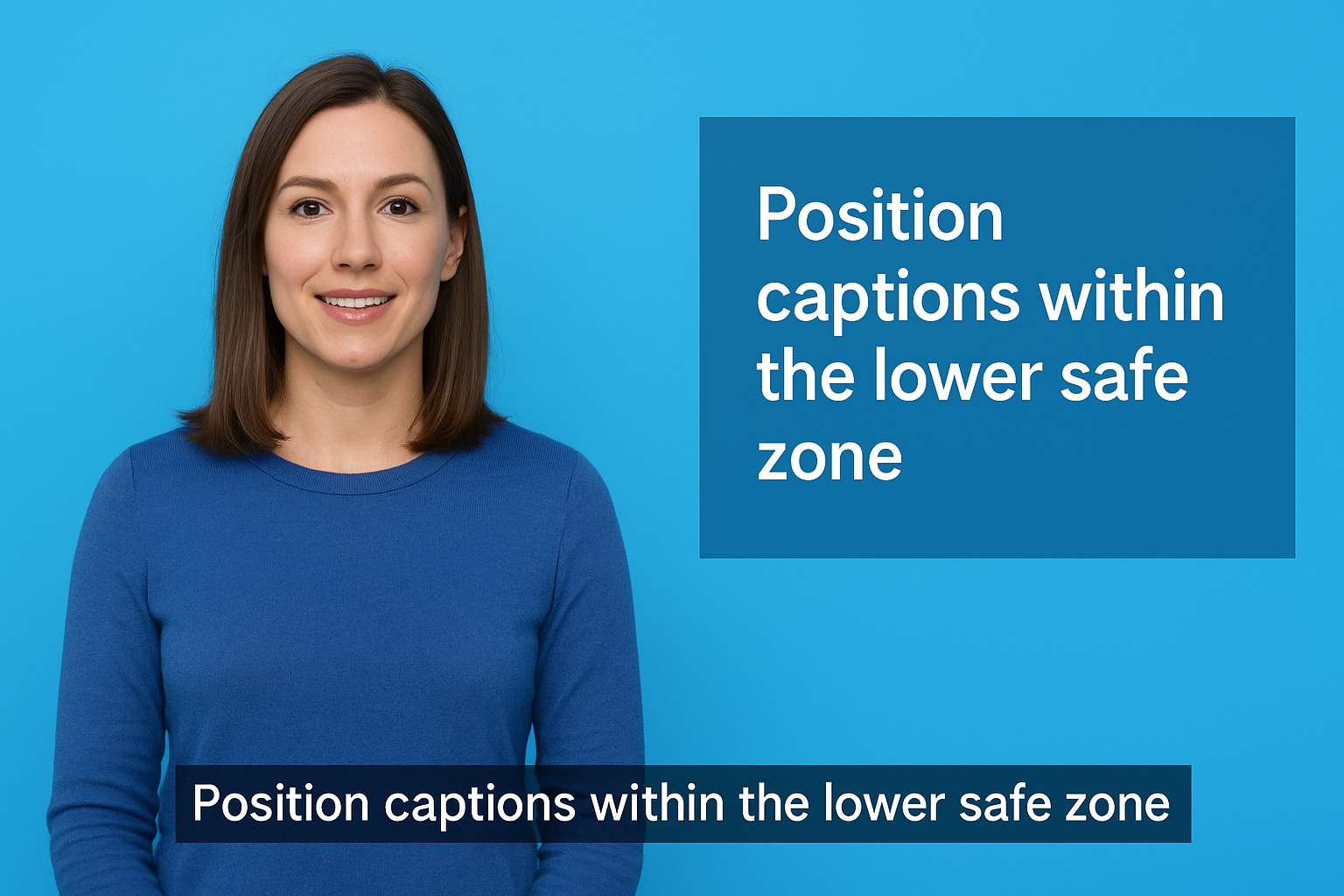
Position captions within the lower safe zone, typically the bottom 10% of the frame, and shift placement upward whenever on-screen text, graphics, or a speaker’s face occupies that area.
Font, contrast, and background styling for legibility
Use a clean sans-serif font at a readable size. Pair caption text with a semi-transparent background bar to maintain contrast against any background color your video uses.
6. Identify speakers clearly in multi-speaker videos
When two or more voices appear in a video, viewers need to know immediately who is speaking without re-reading each caption line. Clear speaker identification is one of the most overlooked captioning best practices, yet it directly determines whether a deaf or hard-of-hearing viewer can follow your content at the same pace as everyone else.
Speaker labels vs dashes vs positioning
Use speaker labels (e.g., INTERVIEWER: or DR. SMITH:) when speakers appear off-screen or when four or more speakers share a conversation. For two on-screen speakers, positioning captions to the relevant side of the frame often works better than labels and keeps the text cleaner.
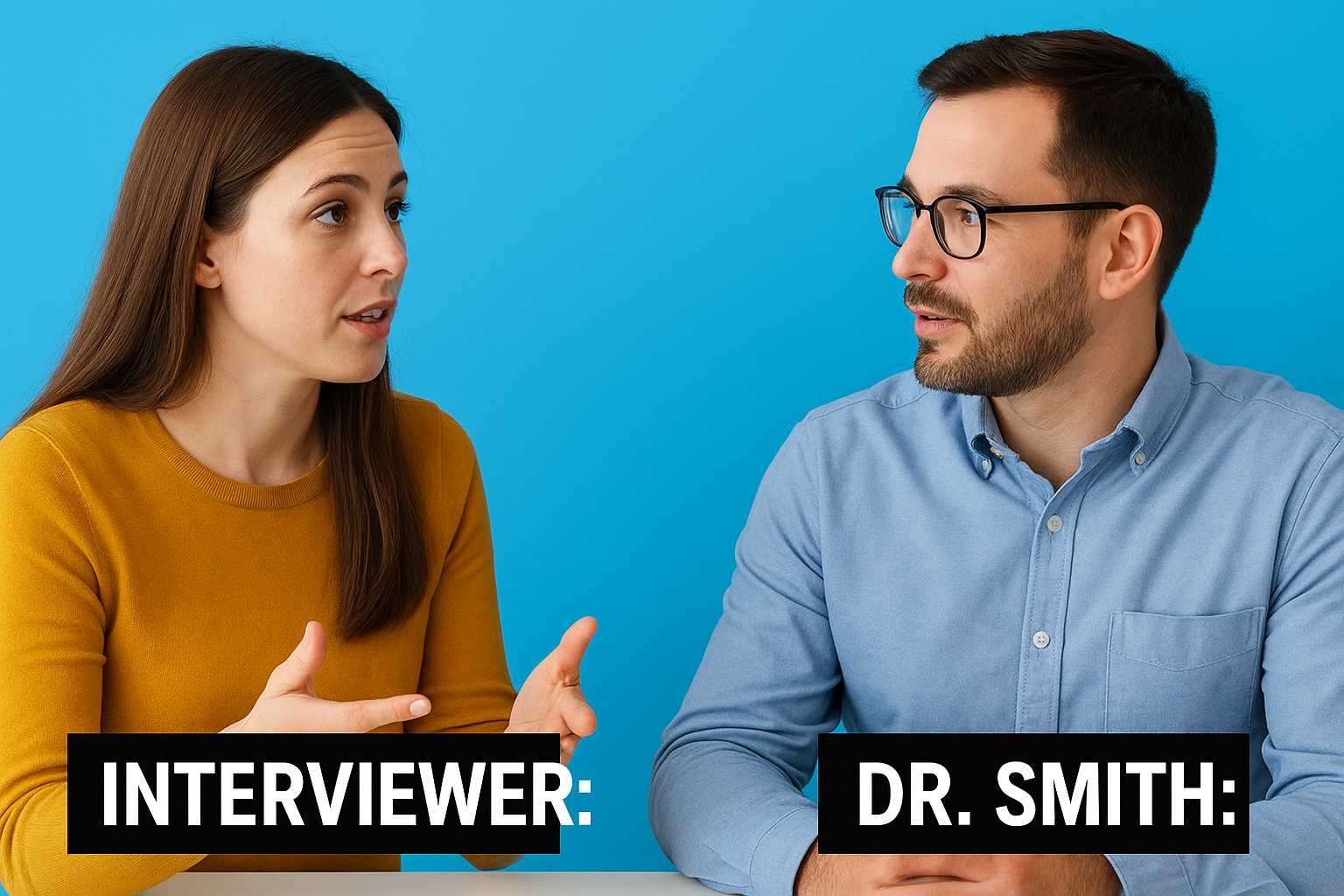
Reserve dashes only when your delivery platform does not support caption positioning, since inconsistent use confuses viewers quickly.
Off-screen speakers, voiceover, and narration
Always label off-screen speakers by name or role the first time they appear, then repeat the label whenever they return after another speaker has spoken. For continuous narration or voiceover, a single label at the start of each segment is sufficient.
Overlapping dialogue and interrupting speech
When speakers talk over each other, caption the dominant or most content-relevant voice first and note the interruption with a brief label on the next line. Avoid trying to stack simultaneous dialogue into a single frame.
Tone and emphasis without over-formatting
Use italics sparingly to signal emphasis a speaker clearly places on a word. Avoid all-caps, bold, or multiple formatting cues in a single caption frame, since visual noise slows reading speed.
7. Caption non-speech sounds and music with intent
Non-speech audio carries meaning that many viewers can only access through captions. When a door slams during a tense scene or an alarm rings off-screen, deaf and hard-of-hearing viewers need that context in the captions to follow what is happening. Treating sound effects and music as optional extras creates a significant gap in your captioning best practices.
Which sounds to caption and which to skip
Caption any sound that carries narrative meaning or affects your viewer’s understanding of the content. Skip ambient sounds that add no useful context, such as general background noise in an outdoor setting with no plot relevance. When in doubt, ask whether a hearing viewer would register the sound as meaningful.
Bracket conventions for sound effects
Place sound descriptions inside square brackets and write them in italics to distinguish them from spoken dialogue. For example: [door slams] or [phone ringing]. Keep descriptions concise and lowercase inside the brackets so they read quickly without interrupting the caption flow.
Music cues vs lyrics and how to caption each
For background music, a brief label is sufficient: [upbeat music]. When lyrics are sung, transcribe them word for word, just as you would spoken dialogue, since lyrics carry direct meaning your viewer cannot access from audio alone.
Skipping sung lyrics is the same as skipping spoken dialogue. Both represent content that some viewers can only reach through captions.
Writing sound descriptions that stay objective
Describe what the sound is, not how you interpret it emotionally. Write [crowd cheering] rather than [exciting crowd noise]. Objective descriptions give every viewer the same factual information without inserting an editorial interpretation that the audio itself does not support.
8. Run QA and deliver captions in the right formats
Publishing captions without a final review pass is one of the most common ways errors and sync issues slip into your finished video. A structured QA process, paired with the right output format for your platform, completes your captioning best practices workflow and prevents problems that are much harder to fix after a video goes live.
A pre-publish checklist for accuracy and sync
Before you publish, play your video from start to finish with captions enabled and check that every caption frame aligns with the spoken audio. Confirm speaker labels are consistent, sound descriptions follow bracket conventions, and no frame sits on screen past its out-point.
Device and player checks across platforms
Run your captions through at least two different devices and media players before finalizing delivery. Caption rendering varies across browsers, mobile devices, and streaming platforms, so a file that looks correct in one environment can break alignment or drop text entirely in another.
Testing on the actual platform your audience uses is non-negotiable before any public release.
Common delivery formats and when to use them
Use SRT files for most web and social platforms, WebVTT for HTML5 video players, and SCC or MCC formats for broadcast delivery. Match the file format to your distribution channel’s technical requirements to avoid upload errors or unsupported formatting.
Version control for edits, updates, and re-uploads
Save every caption file with a clear version number and date in the filename. When you update audio or re-edit video content, treat the caption file as a deliverable that requires its own revision and re-QA cycle before the updated version replaces the original.
Final checklist to ship better captions
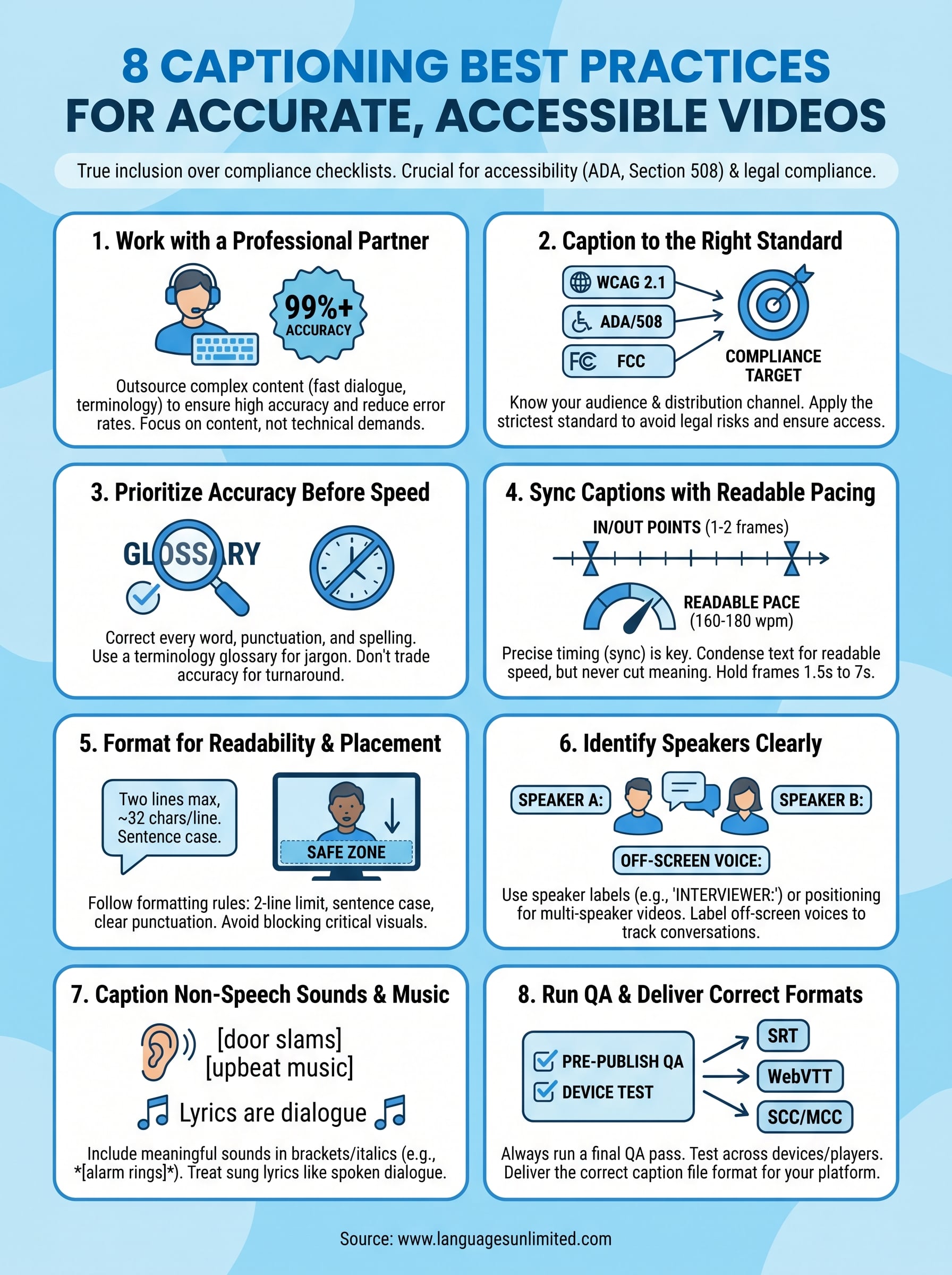
Apply these eight captioning best practices and your videos will reach every viewer who depends on them. Before any caption file leaves your hands, confirm that:
- Accuracy matches the spoken audio from the first frame to the last
- Sync is tight, with in and out points placed within two frames of each word
- Speaker labels are consistent across the entire video
- Sound effects and music follow correct bracket formatting
- Formatting stays at two lines, 32 characters per line, in sentence case
- Your compliance standard is documented and matched to your distribution channel
- The caption file format fits your delivery platform’s requirements
- A version number is saved in the filename before every revision
Viewers who depend on captions for access and inclusion deserve content that clears every item above. If your team needs expert support to get there, contact Languages Unlimited to discuss your captioning project today.